

Overview
Blink’s Rich Text Editor (RTE) is a tool that allows you to create and format text with visual styles. It’s designed to make text look professional, structured, and easy to read.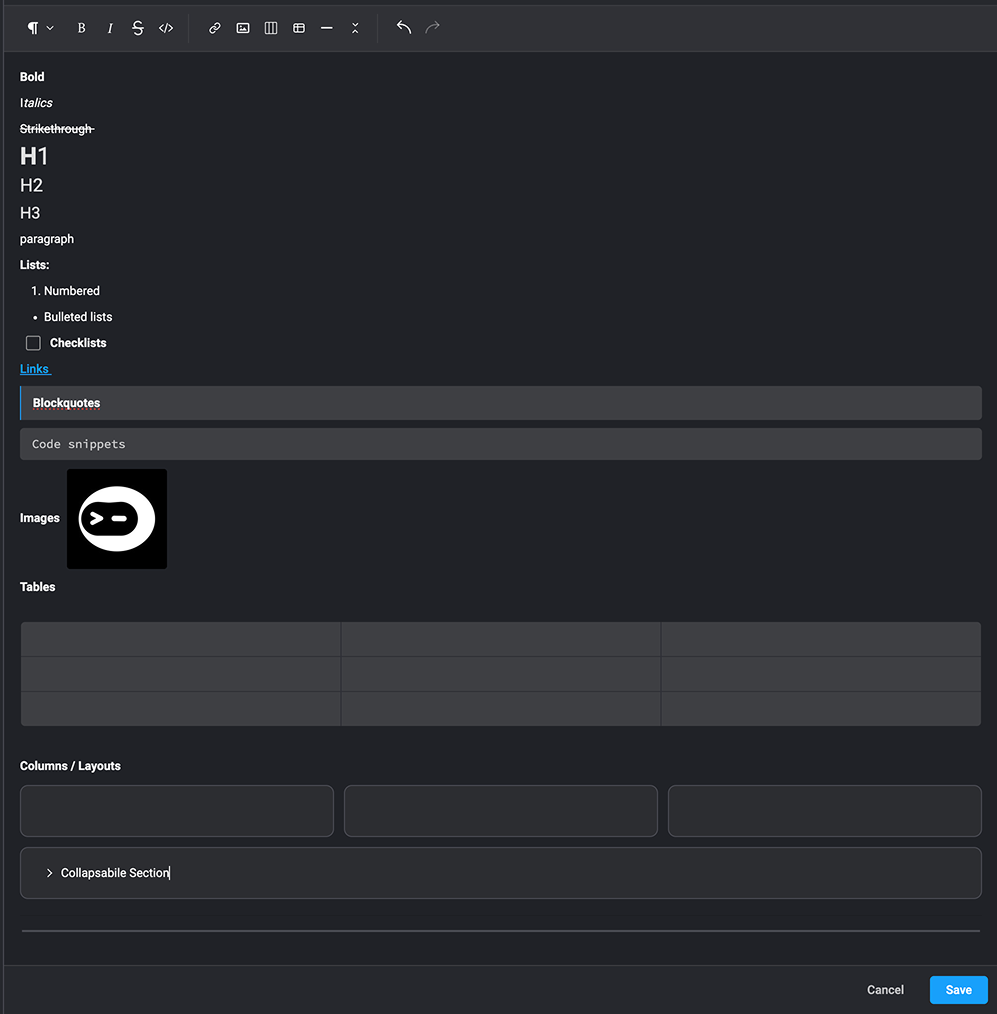
Formatting Options in the Rich Text Editor
Note: When using
HTML in the rich text editor, only the elements supported by the editor will be rendered. Any unsupported HTML may not be displayed as expected. - Bold – Make text stand out. Example: bold
- Italics – Emphasize text. Example: italics
- Underline – Highlight important text. Example: underline
- Strikethrough – Show removed or corrected text. Example:
strikethrough - Headers – Structure your content with headings (H1, H2, H3)
- Lists – Organize content into numbered or bulleted lists
- Links – Add clickable hyperlinks displayed as text
- Checklist- Create interactive checkable items for tasks or to-dos
- Blockquotes – Highlight quotes or important sections
- Code snippets – Display code snippets clearly
- Images – Embed visuals to complement your text
- Tables – Organize data into rows and columns for clarity
- Columns – Arrange content side-by-side, by inserting columns for better readability
- Horizontal Lines – Separate sections of content for clarity (e.g., a divider line)
- Collapsible Sections – Create expandable/collapsible blocks to hide or reveal content (e.g., for meetings, notes, or details)