

Using the Chat Interface with Agent Blink
The chat interface provides analysts with a dynamic and interactive way to engage directly with Agent Blink throughout the investigation process. By combining conversational interaction, AI-driven guidance, and automated workflows (Agent Ability Workflows), the chat interface enables analysts to maintain control over the investigative process while benefiting from Agent Blink’s speed, consistency, and evidence-driven insights. This makes it easier to understand the reasoning behind findings, collaborate on complex cases, and take timely, informed action, ultimately accelerating case resolution and delivering actionable insights throughout the investigation process.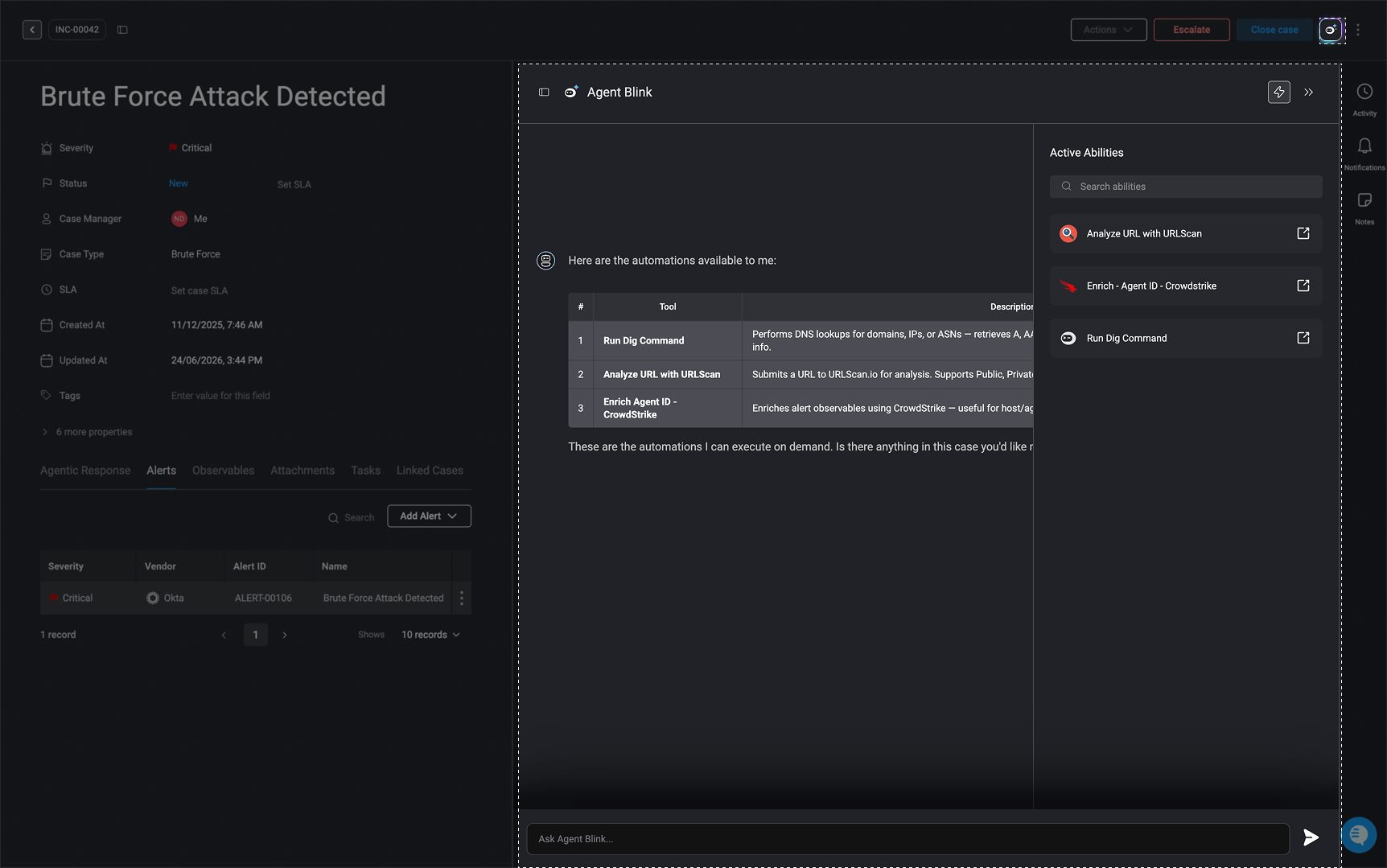
Different Ways Analysts can use Agent Blink for Deeper Insights and Action
Different Ways Analysts can use Agent Blink for Deeper Insights and Action
- Ask Agent Blink follow-up questions – Use follow-up questions to clarify findings, investigate alerts in more detail, or explore alternative hypotheses. This allows analysts to dig deeper into the investigation, validate assumptions, and gain additional context about the activity being analyzed.
- Validate assumptions – Confirm or challenge Agent Blink’s reasoning to ensure accuracy and confidence in conclusions.
- Request additional analysis – Instruct Agent Blink to dig further into specific data points, logs, or assets for more comprehensive insights.
- Initiate response actions – Trigger remediation actions, such as isolating affected endpoints or resetting credentials, directly from the chat interface when appropriate. These actions are executed through deterministic, fully customizable automated workflows that can be triggered and executed automatically via the chat interface, with human approval when required. This allows AI to accelerate response efforts while keeping operations safe, controlled, and fully auditable.
- Leverage Ability Workflows – Use Agent Ability Workflows to automate tasks and retrieve additional insights. Any output generated by these workflows is automatically added to the session context, ensuring all relevant information remains centralized throughout the investigation.
For more information about Ability Workflows, navigate here
Safe Use of AI
It is important that Blink does not use customer data for AI training. We adhere to industry standards to ensure your data remains secure, never stored or utilized for these purposes.
Configure Ability Workflows for Agent Blink
Ability workflows are on-demand workflows that help Agent Blink with additional data and tools for a more detailed analysis and investigation. In any on-demand workflows, you can configure it to be an ability workflow for Agent Blink by toggling the ‘Agent Abilities’ button in the workflow’s settings or on the Workflow Overview page. Once enabled, the workflow is added to the chat interface as an ability workflow. This setting gives the Agent Blink access to the workflow’s configuration and outputs, supporting deeper analysis, informed decision-making, and guided response. With visibility into the workflow’s structure and data, the Copilot can more effectively assist analysts throughout the investigation process.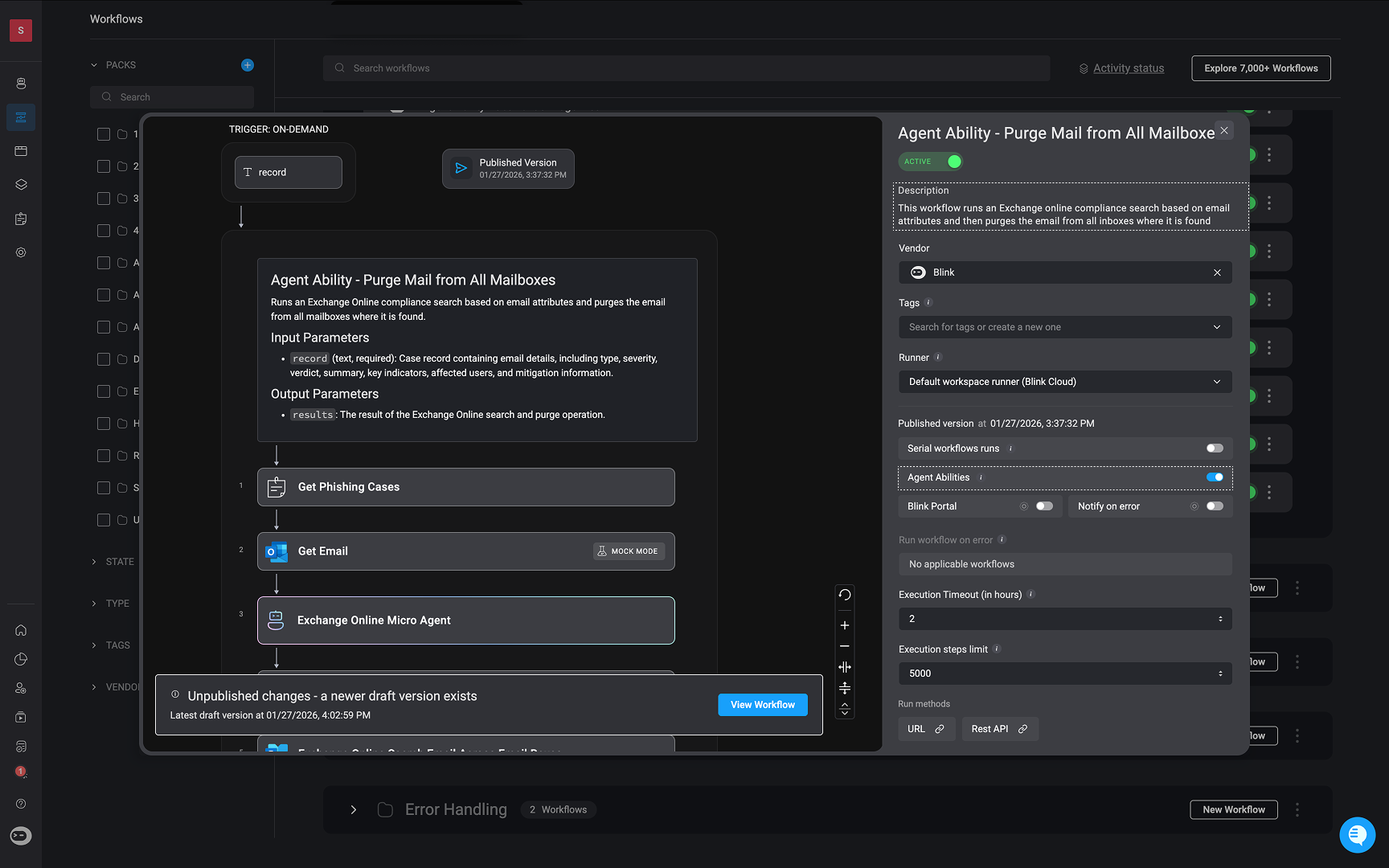
Agent Blink’s Ability Workflow Activity
When Agent Blink triggers an ability workflow, it is automatically recorded and displayed in the Case’s timeline. The log records both the name of the triggered ability workflow and the user who executed it. This ensures full visibility into all Agent Blink’s activity and helps analysts easily keep track of Agent Blink’s activity throughout the investigation.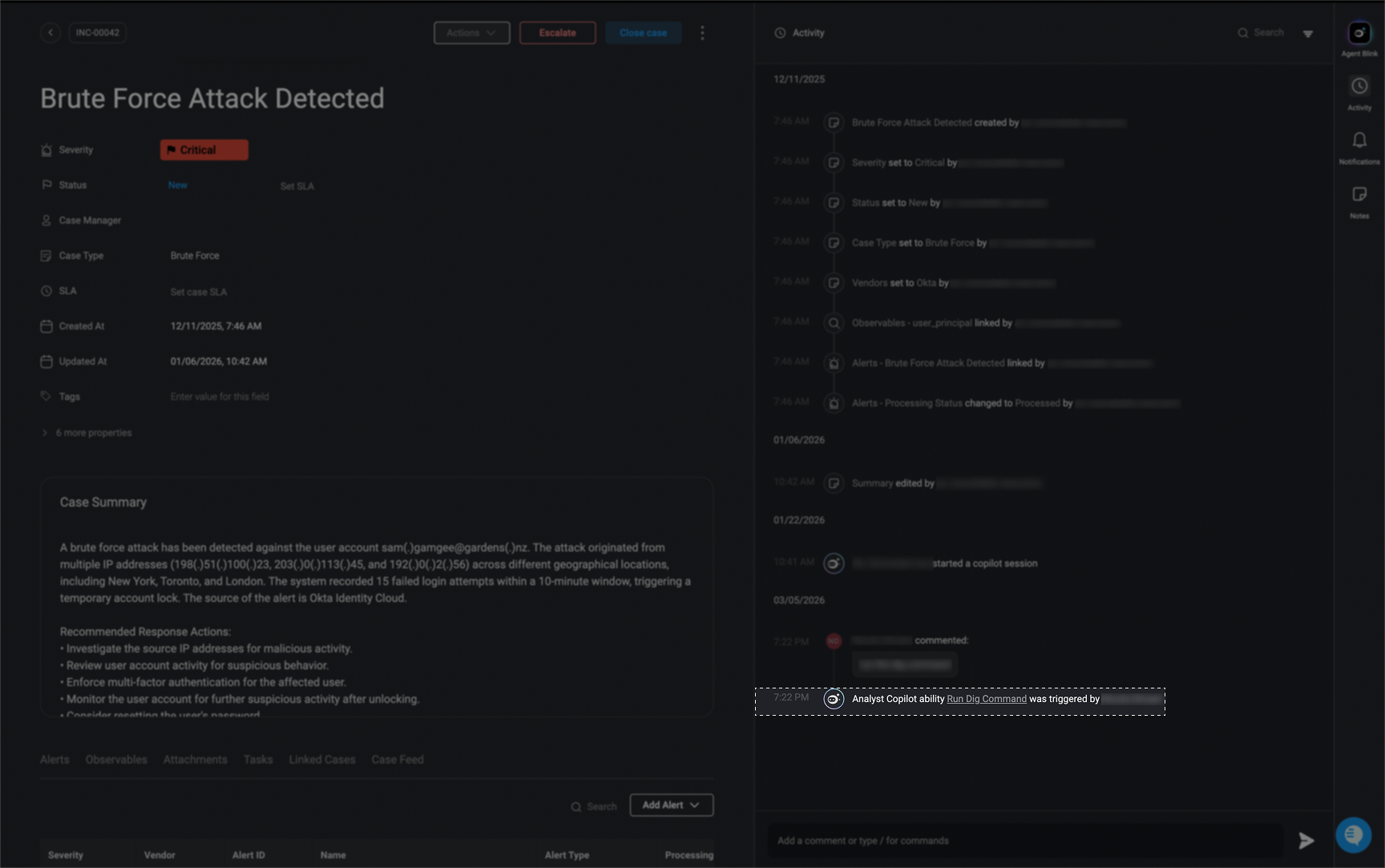
Use Case Examples: Agent Blink in Case Management
Use Case Example: Generate a timeline of events based on the case activity
Use Case Example: Generate a timeline of events based on the case activity
Overview
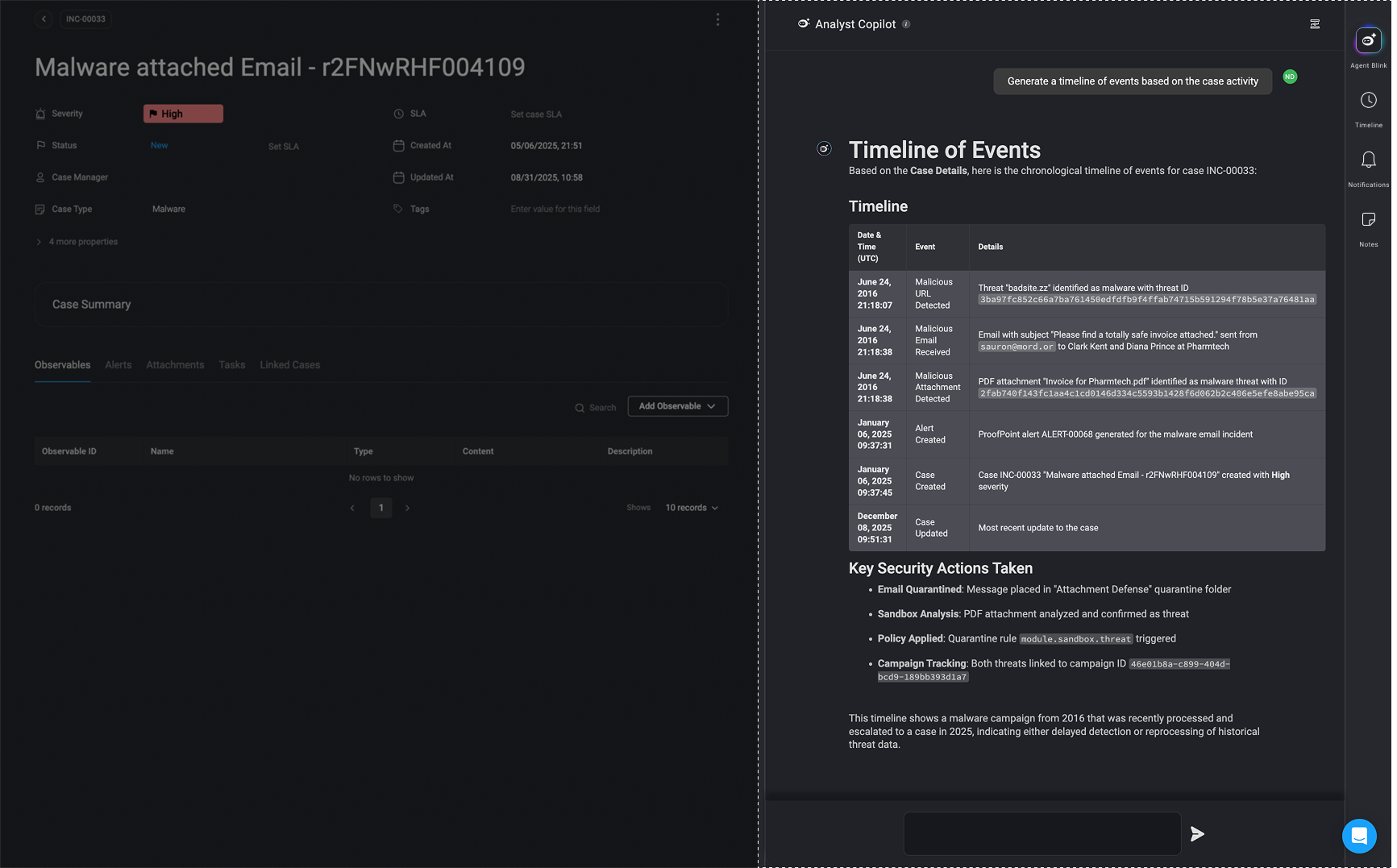
Agent Blink assists security analysts by automatically generating insights and structured timelines for cybersecurity incidents. In this case, it processes details related to a malware-attached email and creates a timeline of events based on case activity.Key Capabilities Demonstrated
-
Automated Timeline Generation
- The Copilot extracts relevant information from the alert and observables sections and structures it into a chronological timeline of events.
- Example:
- Initial detection of a malicious URL.
- Receipt of the malicious email.
- Identification of the malicious attachment.
- Alert generation in Proofpoint security system.
- Case creation in the Blink’s Case Management for investigation.
-
Enhanced Investigation Efficiency
- By automatically summarizing critical case details, Agent Blink reduces manual effort required from analysts.
- This allows analysts to focus on deeper investigations rather than compiling reports.
-
Real-time Case Status Tracking
- The system tracks case status (e.g., “NEW”, “UNDER INVESTIGATION”) and keeps analysts updated.
- Ensures that all stakeholders have a clear progression of events.
Why This is Valuable for Security Teams
- Speeds Up Incident Response – Analysts get an immediate structured summary without manually sifting through logs.
- Improves Accuracy – Extracts key details directly from security tools, reducing human error.
- Enhances Collaboration – Clear, structured timelines help teams coordinate actions effectively.
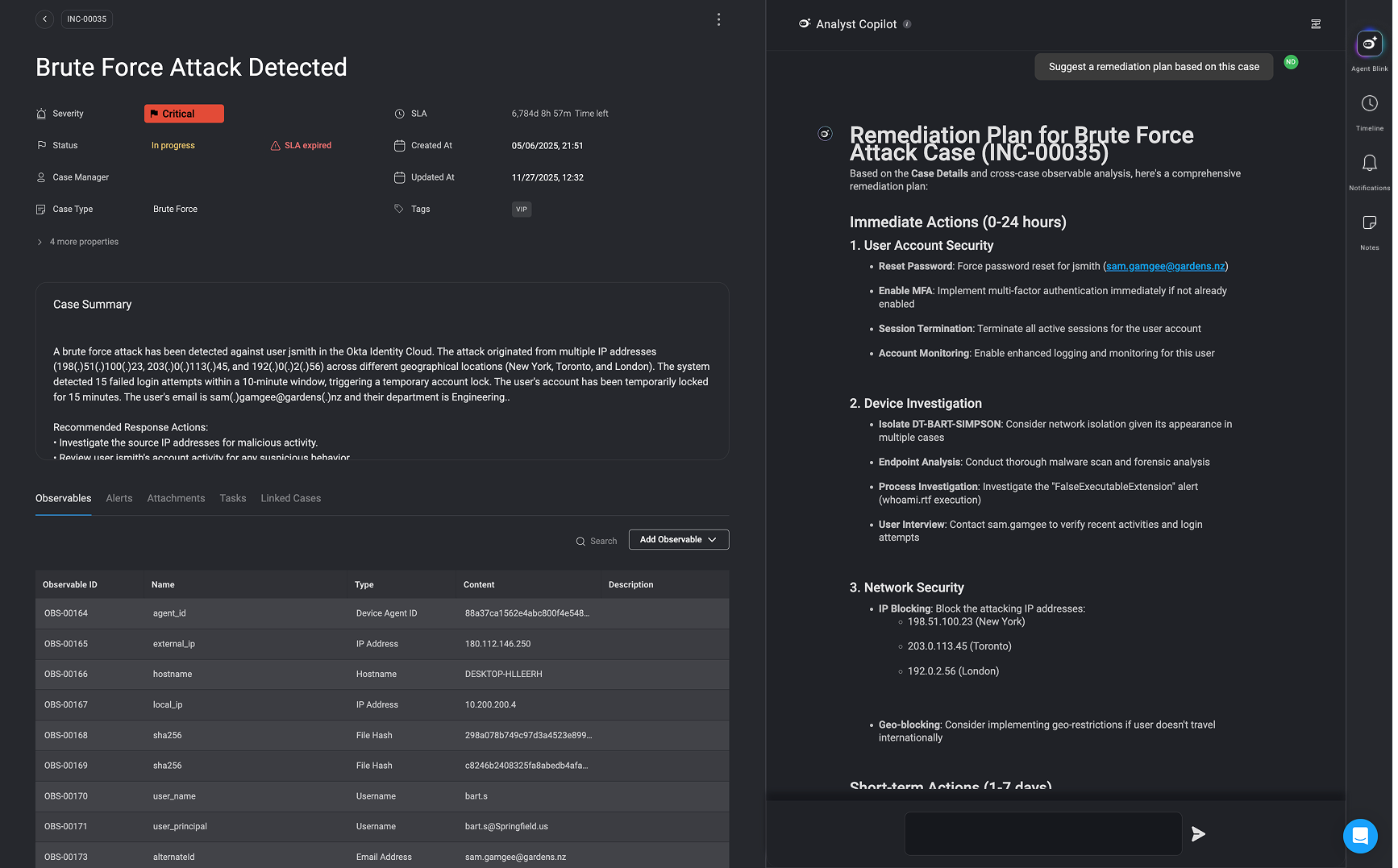
Use Case Example: Suggest a remediation plan based on this case.
Use Case Example: Suggest a remediation plan based on this case.
Overview
In this use case, the Agent Blink assists in responding to a brute force attack involving suspicious login attempts. The copilot helps the analyst review response actions linked to the case, trigger relevant workflows (e.g., DNS lookups), and suggest a detailed remediation plan, all from within the same interface and using natural language commands.Key Capabilities Demonstrated
-
Case Context Awareness
- Identifies and summarizes response actions specific to the case.
- Understands key case elements like involved users, source IPs, and severity.
-
Natural Language Automation Execution
- Executes security workflows based on plain language prompts (e.g., “Investigate source IPs”).
- Automatically maps case data (e.g., IP addresses) to required inputs.
-
Result Interpretation and Next-Step Guidance
- Provides structured output from workflows in plain English.
- Offers follow-up investigation recommendations based on results (e.g., manual IP analysis after NXDOMAIN result).
-
Remediation Planning Support
- Generates a step-by-step remediation plan organized by urgency (Immediate, Short-term, Medium-term, Long-term).
- Takes into account case metadata such as severity, user role, and business impact.
Why This Is Valuable for Security Teams
- Reduces Analyst Workload Automatically surfaces relevant information and actions without needing to manually navigate through multiple tools or tabs.
- Accelerates Incident Response Automated workflows can be executed and interpreted instantly, significantly reducing investigation and response time.
- Promotes Consistent and Repeatable Workflows Ensures incident handling follows a structured process, even for less experienced analysts.
- Enhances Transparency and Documentation Each action is traceable and tied to the case timeline, supporting audit and compliance needs.
- Keeps Momentum Despite Tooling Gaps The copilot doesn’t fail silently, it identifies where coverage is missing and recommends manual next steps, helping teams maintain investigative momentum.
Best Practices
- Be clear and precise: Providing clear and specific instructions will assist Agent Blink in understanding your instructions clearly.
- Use complete integration names: For example, instead of using generic terms like Compute Instance, specify the full name of the relevant integrations, such as AWS EC2 Compute Instance.
- Refrain from using unknown or unrecognized vendors in your prompt.
Related Articles
Case Management
Effectively handle security incident investigations by providing detailed information and logs in one place on a single view
Cases
Track, manage, and resolve cases efficiently.
Alerts
Track, manage, and resolve alerts efficiently.
Observables
Create, Extract and manage observables efficiently.