

Subflow - Missing Alert Template Notification
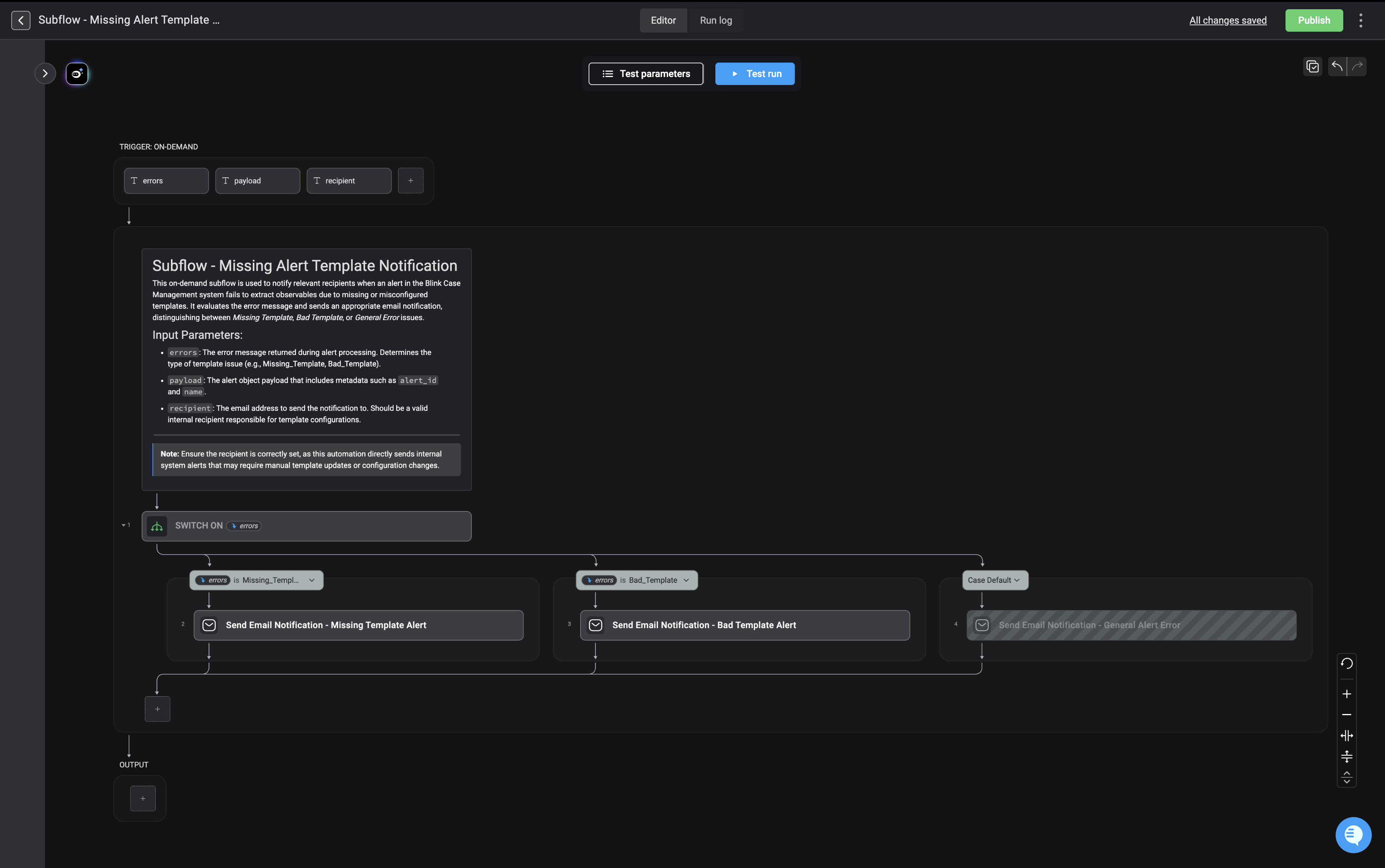
The “Subflow - Missing Alert Template” workflow is an on-demand process designed to notify internal recipients when there is an error with an observable extraction rule (template) in the Extract Observable Action Specifically, it handles situations where:- A required alert template is missing
- An alert template is misconfigured (bad template)
- A general alert error occurs
Trigger Section
Trigger Type: On-Demand
The subflow expects three input parameters:1. errors
- The error message returned during alert processing.
- Determines the classification of the issue.
-
Example values:
Missing_TemplateBad_Template- Other general error types
2. payload
- The full alert object payload.
-
Contains metadata such as:
alert_idname- Any other contextual information needed for notification.
3. recipient
- The internal email address that will receive the notification.
- Must be a valid email address.
- Typically assigned to someone responsible for maintaining or configuring templates.
Main Logic: Switch on errors
After receiving the inputs, the workflow uses a Switch condition on the errors parameter.
This acts like a decision tree:
- It evaluates the value of
errors - Routes execution to the matching branch
Branch 1: Missing Template
Condition:errors is Missing_Template
Action:
Send Email Notification – Missing Template Alert
This email informs the recipient that:
- A required alert template does not exist
- Manual intervention may be required to create or restore it
Branch 2: Bad Template
Condition:errors is Bad_Template
Action:
Send Email Notification – Bad Template Alert
This email informs the recipient that:
- The template exists
- But it is misconfigured, malformed, or invalid
- Configuration needs to be reviewed and corrected
Branch 3: Default Case (General Error)
Condition: Any other error value not matching the first two cases Action: Send Email Notification – General Alert Error This ensures:- No alert failure goes unnoticed
- Even unclassified or unexpected errors are reported
- There is a safety net for edge cases