> ## Documentation Index
> Fetch the complete documentation index at: https://docs.blinkops.com/llms.txt
> Use this file to discover all available pages before exploring further.

# Run Cloud Query Actions

> Use query actions to search and retrieve data from connected services within your Blink workflows.

Cloud/file query Actions perform [Steampipe queries](https://steampipe.io/) on resources with a powerful and simple PostgreSQL syntax.

For example, a complicated action such as fetching all of your EC2 instance IDs in AWS across all regions can be done simply by running the "Run AWS Cloud Query" action and the following query:

```sql theme={"dark"}
select instance_id from aws_ec2_instance
```

Each cloud query action can be found under the relevant vendor's collection.

## Supported plugins

<Note>
  **NOTE**

  Pay attention to the version of the supported plugins, and be aware of the features supported by this version.
</Note>

### Blink enables running the following query actions and their corresponding versions:

<CardGroup> <Card title="Run AWS Cloud Query" icon="aws" href="/docs/integrations/aws/actions/cloud-query.md" iconType="solid" horizontal> v0.76.0 </Card> <Card title="Run Azure Cloud Query" icon="microsoft" href="/docs/integrations/azure/actions/cloud-query.md" iconType="solid" horizontal> v0.31.0 </Card> <Card title="Run GCP Cloud Query" icon="google" href="/docs/integrations/gcp/actions/cloud-query.md" iconType="solid" horizontal> v0.26.0 </Card> <Card title="Run GitHub Cloud Query" icon="github" href="/docs/integrations/github/actions/cloud-query.md" iconType="solid" horizontal> v0.19.0 </Card> <Card title="Run Kubernetes Cloud Query" icon="code" href="/docs/integrations/kubernetes/actions/cloud-query.md" iconType="solid" horizontal> v0.10.0 </Card> <Card title="Run Oracle-Cloud Infrastructure Query" icon="cloud" href="/docs/integrations/oracle-cloud/actions/cloud-query.md" iconType="solid" horizontal> v0.17.2 </Card> <Card title="Run CrowdStrike Cloud Query" icon="shield" href="/docs/integrations/crowdstrike/actions/cloud-query.md" iconType="solid" horizontal> v0.2.0 </Card> </CardGroup>

## File Identifiers With Cloud Queries

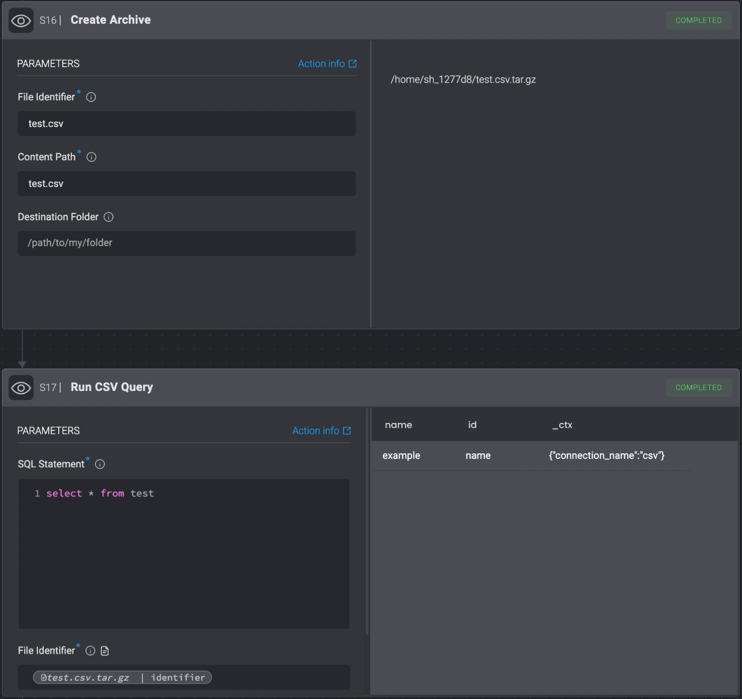
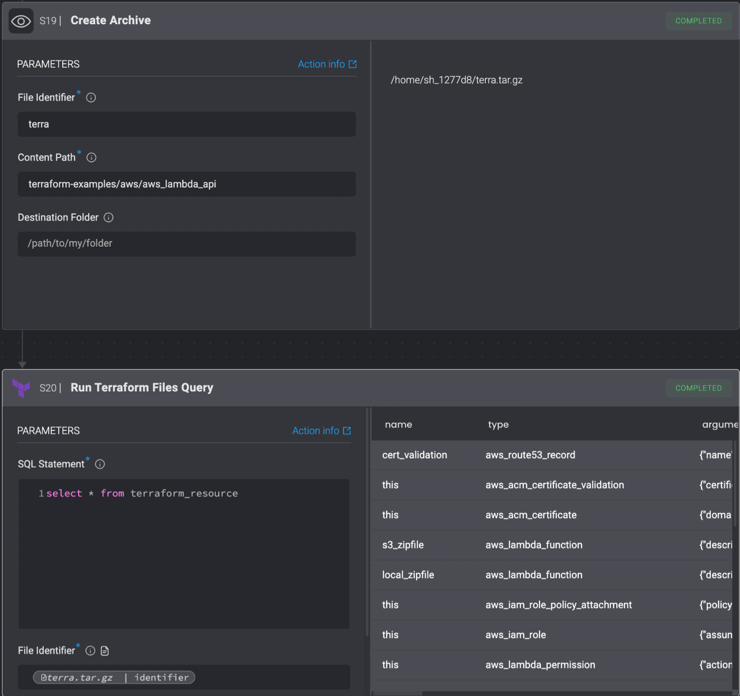
Some plugins, such as the *Run CSV Query* or *Run Terraform Files Query*, receive a File Identifier parameter, which allows them to query data from a compressed file/folder.
The File Identifier can be obtained by running the [*Create Archive*](/docs/workflows/building-workflows/actions/utility-actions/file-actions#create-archive) action.

For example, in order to query data from a CSV:

1. Download the csv (using cURL or a Download File action)/Clone the repository containing it using the Git Clone action.
2. Create an archive of the cloned repo / downloaded file using the *Create Archive* action.
3. Using the Variable Picker, select the file identifier created in the previous step, and pass it as a Parameter to the *Run CSV File Query* Action.

<CardGroup cols={1}>
  <Card title="Run CSV Query" icon="file" href="https://hub.steampipe.io/plugins/turbot/csv" iconType="solid" horizontal> v0.4.1</Card>
</CardGroup>

<Frame>
  <img src="https://mintcdn.com/blinkops-2/deay2AiePWJDKGEh/img/Actions/Steampipe/RunCSVQuery.png?fit=max&auto=format&n=deay2AiePWJDKGEh&q=85&s=bb937c3432f4a162d0e2ca1990e28187" width="742" height="699" data-path="img/Actions/Steampipe/RunCSVQuery.png" />
</Frame>

<CardGroup cols={1}>
  <Card title="Run Terraform Files Query" icon="file" href="/docs/integrations/terraform-cloud/actions/files-query" iconType="solid" horizontal>v0.2.0</Card>
</CardGroup>

<Frame>
  <img src="https://mintcdn.com/blinkops-2/deay2AiePWJDKGEh/img/Actions/Steampipe/RunTerraformFilesQuery.png?fit=max&auto=format&n=deay2AiePWJDKGEh&q=85&s=3809d0195a04a6c8417524deef5c996b" width="740" height="696" data-path="img/Actions/Steampipe/RunTerraformFilesQuery.png" />
</Frame>