> ## Documentation Index
> Fetch the complete documentation index at: https://docs.blinkops.com/llms.txt
> Use this file to discover all available pages before exploring further.
# TheHive
> TheHive is a scalable Security Incident Response Platform, tightly integrated with MISP (Malware Information Sharing Platform), designed to make life easier for SOCs, CSIRTs, CERTs and any information security practitioner dealing with security incidents that need to be investigated and acted upon.
## Creating a TheHive connection[](#creating-a-thehive-connection "Direct link to Creating a TheHive connection")
## Using API Key[](#using-api-key "Direct link to Using API Key")
To create the connection you need:
* An API Key
* A Domain
### Obtaining the credentials[](#obtaining-the-credentials "Direct link to Obtaining the credentials")
1. Login to your TheHive user.
2. Click on your username at the top right of the screen.
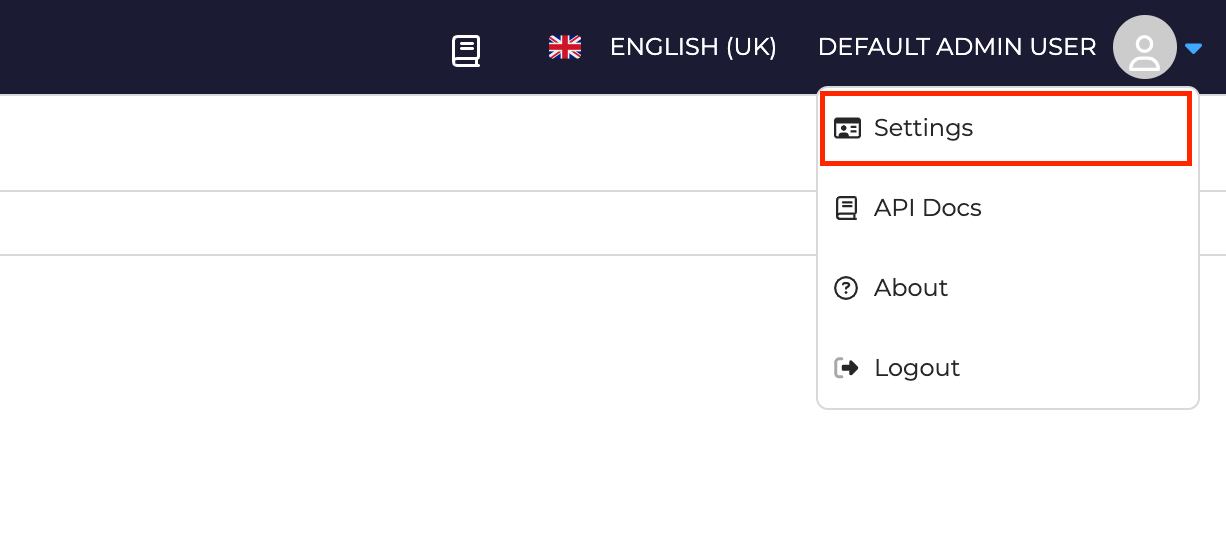
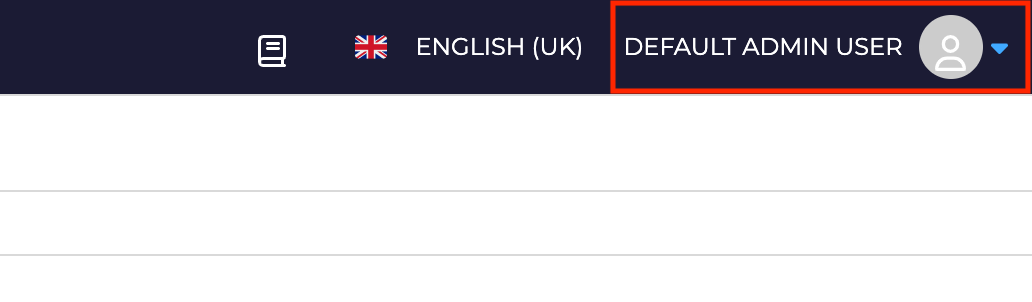 3. Click on **Settings**.
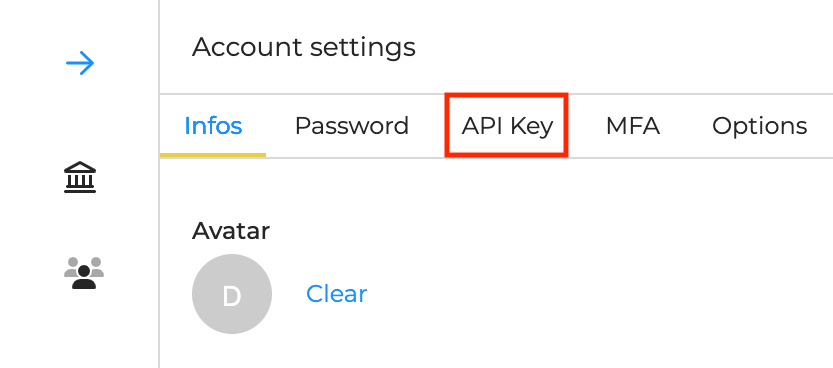
 4. Click on the **API Key** tab.
 5. Click on **Reveal** and copy your API key.
### Creating your connection[](#creating-your-connection "Direct link to Creating your connection")
1. In the Blink platform, navigate to the **Connections** page > **Add connection**. A New Connection dialog box opens displaying icons of external service providers available.
2. Select the **TheHive** icon. A dialog box with name of the connection and connection methods appear.
3. (Optional) Edit the name of the connection. At a later stage you cannot edit the name.
4. Select **API Key** as the method to create the connection.
5. Fill in the parameters:
* The API Key
* The Domain
6. (Optional) Click **Test Connection** to test it.
7. Click **Create connection**. The new connection appears on the **Connections** page.
5. Click on **Reveal** and copy your API key.
### Creating your connection[](#creating-your-connection "Direct link to Creating your connection")
1. In the Blink platform, navigate to the **Connections** page > **Add connection**. A New Connection dialog box opens displaying icons of external service providers available.
2. Select the **TheHive** icon. A dialog box with name of the connection and connection methods appear.
3. (Optional) Edit the name of the connection. At a later stage you cannot edit the name.
4. Select **API Key** as the method to create the connection.
5. Fill in the parameters:
* The API Key
* The Domain
6. (Optional) Click **Test Connection** to test it.
7. Click **Create connection**. The new connection appears on the **Connections** page.