> ## Documentation Index
> Fetch the complete documentation index at: https://docs.blinkops.com/llms.txt
> Use this file to discover all available pages before exploring further.
# Terraform Files Query
## Background[](#background "Direct link to Background")
The *Run Terraform Files Query* Action performs [Steampipe queries](https://hub.steampipe.io/plugins/turbot/terraform) on Terraform file resources with a powerful and simple PostgreSQL syntax.
For example, fetching all basic info on Terraform providers can be done simply:
```
select name, alias, arguments, pathfrom terraform_provider;
```
Get filters for each AWS EC2 AMI:
```
with filters as (select name, type, jsonb_array_elements(arguments -> 'filter') as filter, pathfrom terraform_data_sourcewhere type = 'aws_ami')select name, type, filter -> 'name' as name, filter -> 'values' as values, pathfrom filters;
```
A query to list Azure storage accounts that allow public blob access:
```
name, case when arguments -> 'allow_blob_public_access' is null then false else (arguments -> 'allow_blob_public_access')::boolean end as allow_blob_public_access, pathfrom terraform_resourcewhere type = 'azurerm_storage_account' -- Optional arg that defaults to false and (arguments -> 'allow_blob_public_access')::boolean;
```
A full description of all existing tables and official examples are provided here:
* [The Official Terraform Plugin Documentation](https://hub.steampipe.io/plugins/turbot/terraform/tables)
Blink supports Steampipe version v0.3.0.
## Usage[](#usage "Direct link to Usage")
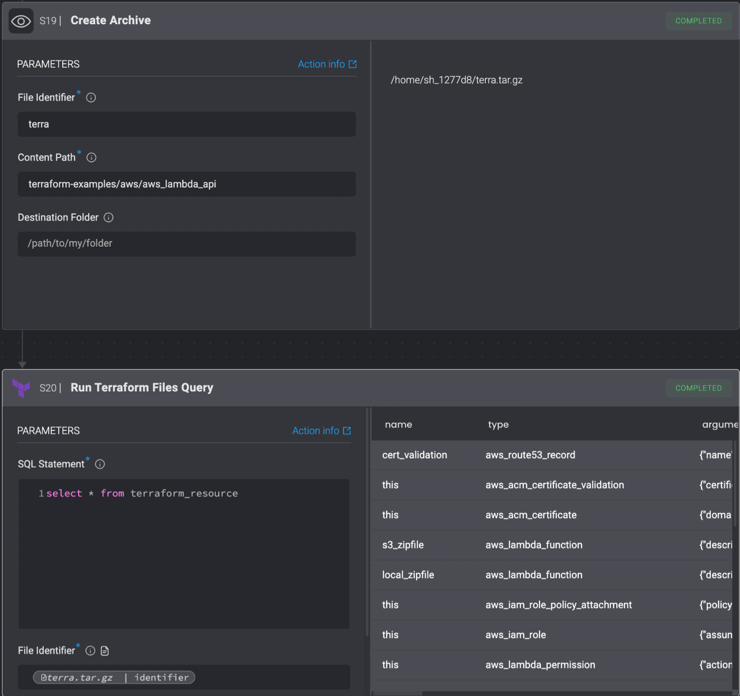
Unlike other query actions in Blink, the *Run Terraform Files Query* is used on static files which need to be fetched and stored during the Automation's execution before being referenced by the action using the "File Identifier" parameter. The File Identifier can be obtained by running the [*Create Archive*](/docs/workflows/building-workflows/actions/utility-actions) action.
For example, to query data from a Terraform repository:
1. Clone the repository using the *Git Clone* action.
2. Create an archive of the repository using the *Create Archive* action.
3. Using the Variable Picker, select the file identifier created in the previous step, and pass it as a parameter to the *Run Terraform Cloud Query* Action.
## Action Parameters[](#action-parameters "Direct link to Action Parameters")
| Parameter | Description |
| --------------- | ------------------------------------------------------------------------------------------- |
| SQL statement | The SQL query to execute against database resources. Use standard SQL syntax. |
| File Identifier | The identifier of a .tar.gz archive from which data will be queried. |
| Output format | The representation of the output result. The possible options are "Table", "CSV" or "JSON". |