> ## Documentation Index
> Fetch the complete documentation index at: https://docs.blinkops.com/llms.txt
> Use this file to discover all available pages before exploring further.
# CrowdStrike
> CrowdStrike is a cyber-security technology company that provides cloud workload and endpoint security, threat intelligence, and cyberattack response services.
## Creating a CrowdStrike connection[](#creating-a-crowdstrike-connection "Direct link to Creating a CrowdStrike connection")
To create the connection you need:
* A client ID
* A client secret
* An API address
### Obtaining the credentials[](#obtaining-the-credentials "Direct link to Obtaining the credentials")
1. In your Falcon console, go to **Support** > **API Clients and Keys**.
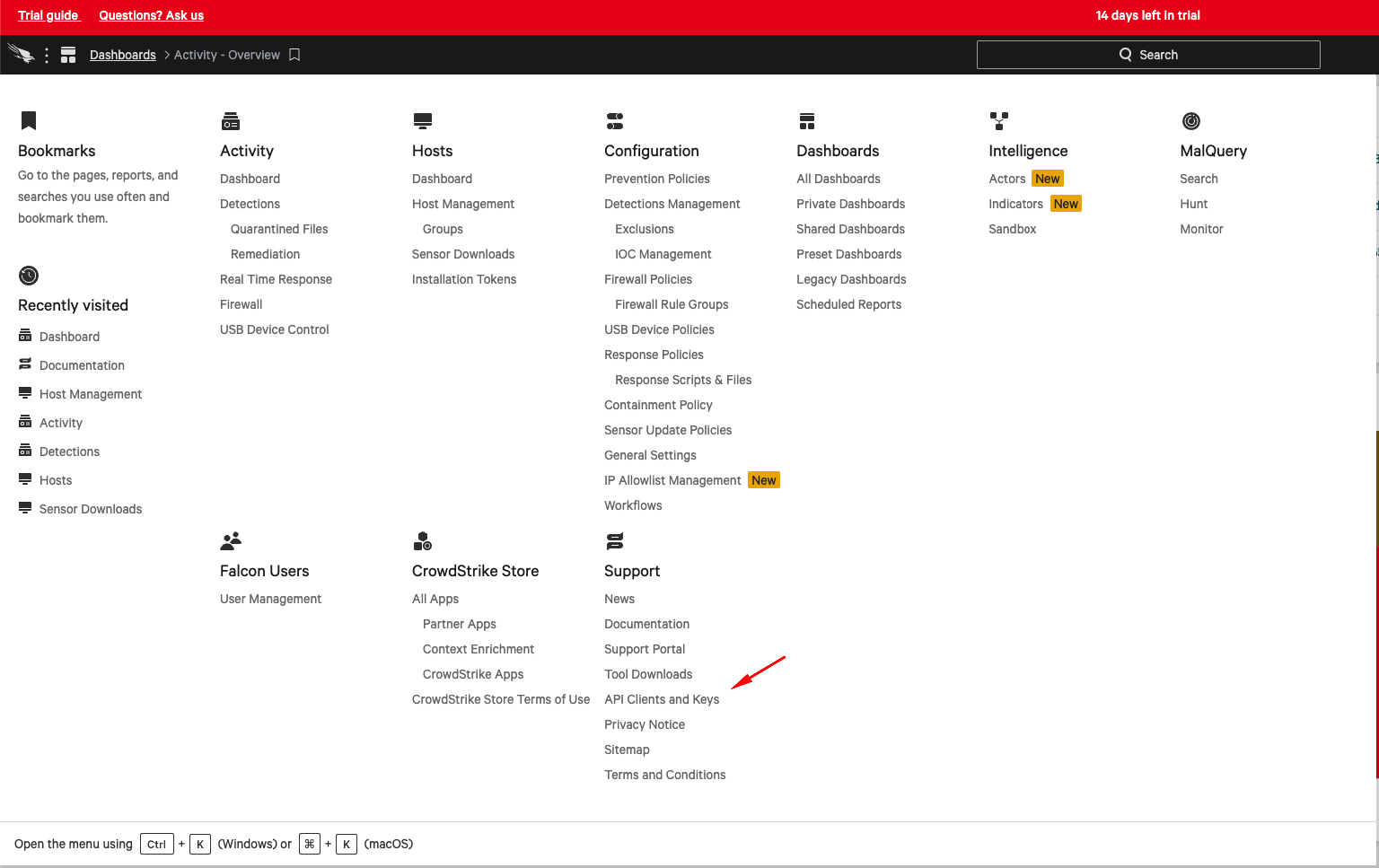 2. Click **Add new API client**.
 3. Name your new API client, optionally give it a description, and select its scopes and click **Add**.
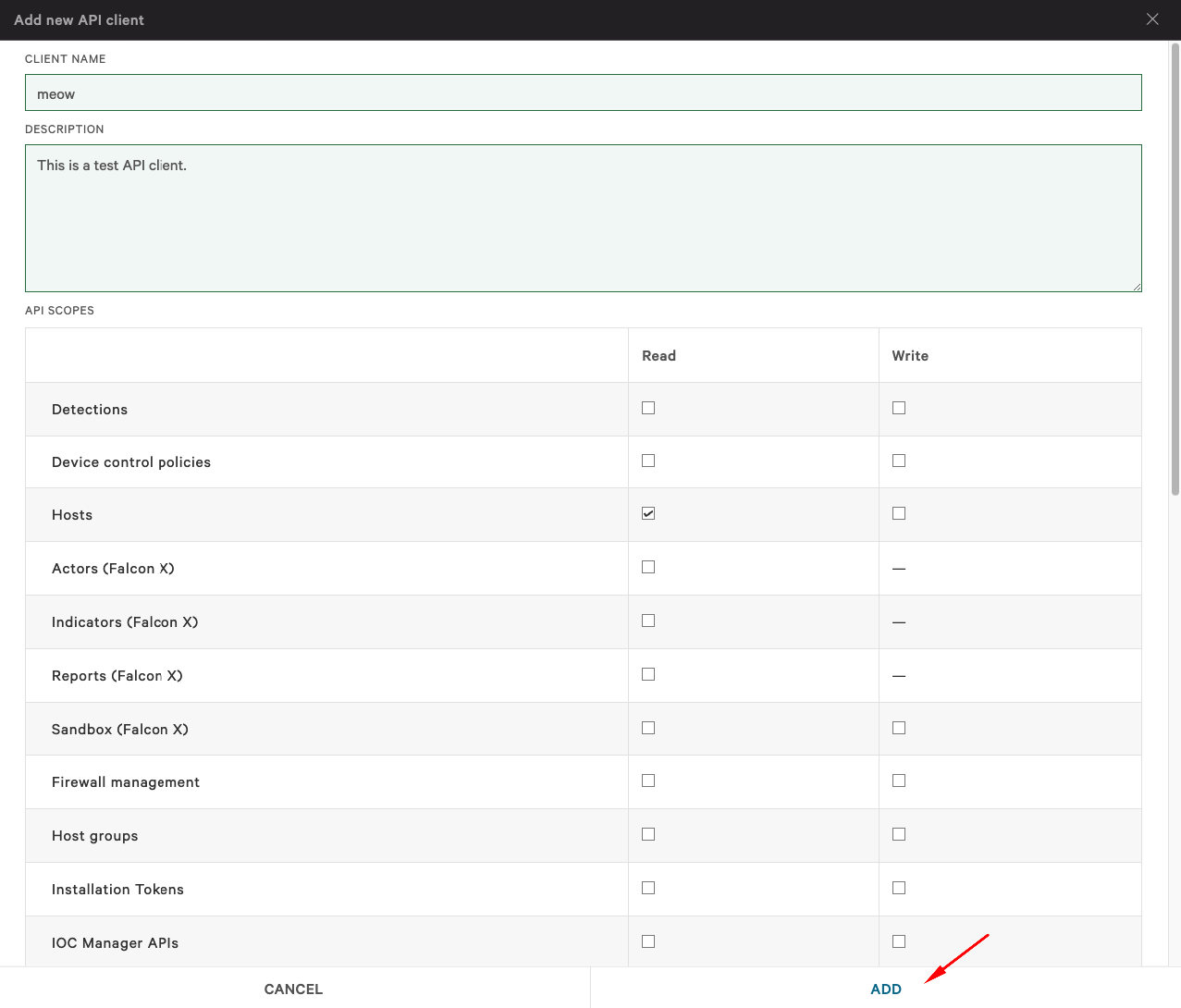 4. Copy and save your Client ID, Client Secret and base URL.
### Creating your connection[](#creating-your-connection "Direct link to Creating your connection")
1. In the Blink platform, navigate to the **Connections** page > **Add connection**. A New Connection dialog box opens displaying icons of external service providers available.
2. Select the **CrowdStrike** icon. A dialog box with name of the connection and connection methods appear.
3. (Optional) Edit the name of the connection. At a later stage you cannot edit the name.
4. Select **Client Secret** as the method to create the connection.
5. Fill in the parameters:
* The client ID
* The client secret
* The API address
6. (Optional) Click **Test Connection** to test it.
7. Click **Create connection**. The new connection appears on the **Connections** page.
### Interactive Tutorial Guides[](#interactive-tutorial-guides "Direct link to Interactive Tutorial Guides")
You can also refer to the following tutorial guides for a more in-depth understanding of how to create CrowdStrike connection.
[Creating a CrowdStrike Connection](https://demo.arcade.software/HDOX2pakpTj8GWgDlfs5?embed\&show_copy_link=true)
[Creating a CrowdStrike Connection in Blink Ops](https://demo.arcade.software/c1Tzl4ryU2it5raz3KJV?embed\&show_copy_link=true)
4. Copy and save your Client ID, Client Secret and base URL.
### Creating your connection[](#creating-your-connection "Direct link to Creating your connection")
1. In the Blink platform, navigate to the **Connections** page > **Add connection**. A New Connection dialog box opens displaying icons of external service providers available.
2. Select the **CrowdStrike** icon. A dialog box with name of the connection and connection methods appear.
3. (Optional) Edit the name of the connection. At a later stage you cannot edit the name.
4. Select **Client Secret** as the method to create the connection.
5. Fill in the parameters:
* The client ID
* The client secret
* The API address
6. (Optional) Click **Test Connection** to test it.
7. Click **Create connection**. The new connection appears on the **Connections** page.
### Interactive Tutorial Guides[](#interactive-tutorial-guides "Direct link to Interactive Tutorial Guides")
You can also refer to the following tutorial guides for a more in-depth understanding of how to create CrowdStrike connection.
[Creating a CrowdStrike Connection](https://demo.arcade.software/HDOX2pakpTj8GWgDlfs5?embed\&show_copy_link=true)
[Creating a CrowdStrike Connection in Blink Ops](https://demo.arcade.software/c1Tzl4ryU2it5raz3KJV?embed\&show_copy_link=true)