> ## Documentation Index
> Fetch the complete documentation index at: https://docs.blinkops.com/llms.txt
> Use this file to discover all available pages before exploring further.
# BambooHR
> BambooHR is all-in-one HR software made for small and medium businesses and the people who work in them — like you. BambooHR makes it easy to collect, maintain, and analyze your people data, improve the way you hire talent, onboard new employees, manage compensation, and develop your company culture.
## Creating a BambooHR connection[](#creating-a-bamboohr-connection "Direct link to Creating a BambooHR connection")
To create the connection you need:
* An API key
### Obtaining the credentials[](#obtaining-the-credentials "Direct link to Obtaining the credentials")
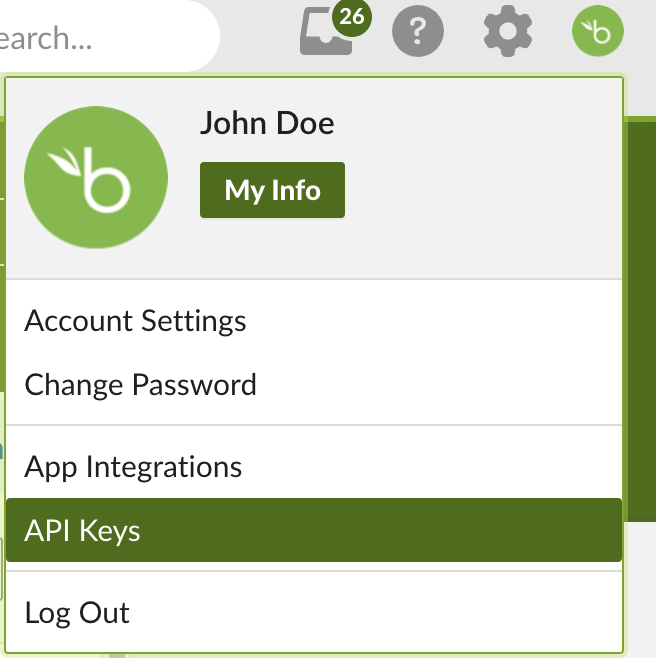
1. Click your profile picture, and then select API Keys.
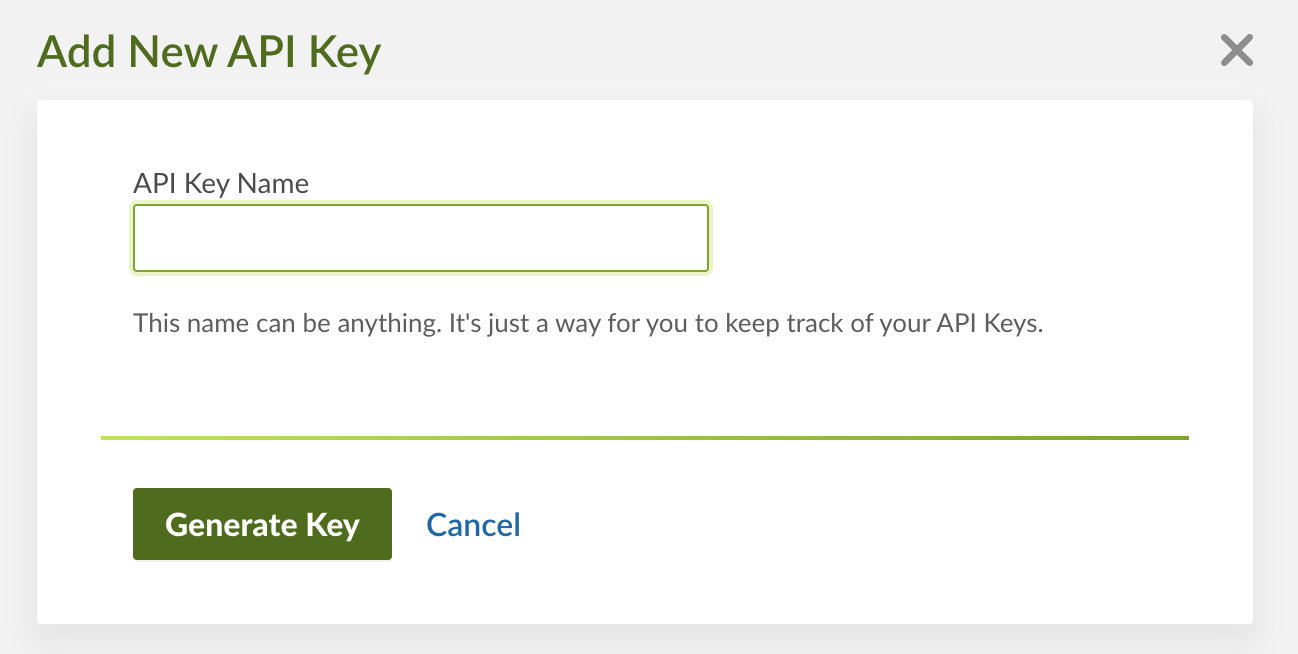
 2. Click **Add New Key**.
 3. Enter an **API Key Name** and click **Generate Key**.
 Each API request sent from a third-party application to the BambooHR website
will be authenticated and permissioned as if a real user were using the
software. The permissions of the user associated with the API request will
determine which fields and employees each API request is allowed to view
and/or edit.
4. Copy the generated token.
### Creating your connection[](#creating-your-connection "Direct link to Creating your connection")
1. In the Blink platform, navigate to the **Connections** page > **Add connection**. A New Connection dialog box opens displaying icons of external service providers available.
2. Select the **BambooHR** icon. A dialog box with name of the connection and connection methods appear.
3. (Optional) Edit the name of the connection. At a later stage you cannot edit the name.
4. Select **API Key** as the method to make the connection.
5. Fill in the parameters:
* The company domain
* The API key
6. (Optional) Click **Test Connection** to test it.
7. Click **Create connection**. The new connection appears on the **Connections** page.
Each API request sent from a third-party application to the BambooHR website
will be authenticated and permissioned as if a real user were using the
software. The permissions of the user associated with the API request will
determine which fields and employees each API request is allowed to view
and/or edit.
4. Copy the generated token.
### Creating your connection[](#creating-your-connection "Direct link to Creating your connection")
1. In the Blink platform, navigate to the **Connections** page > **Add connection**. A New Connection dialog box opens displaying icons of external service providers available.
2. Select the **BambooHR** icon. A dialog box with name of the connection and connection methods appear.
3. (Optional) Edit the name of the connection. At a later stage you cannot edit the name.
4. Select **API Key** as the method to make the connection.
5. Fill in the parameters:
* The company domain
* The API key
6. (Optional) Click **Test Connection** to test it.
7. Click **Create connection**. The new connection appears on the **Connections** page.