> ## Documentation Index
> Fetch the complete documentation index at: https://docs.blinkops.com/llms.txt
> Use this file to discover all available pages before exploring further.

# Case Management Permissions

> Role-based permissions for accessing and managing cases, alerts, and tasks in Blink case management.

In the Case Management feature, user access is controlled through **roles**, which define what actions each user can perform such as viewing cases, creating cases, closing cases, editing cases or managing Case Management settings.

There are two types of **role scopes** in the Blink Platform:

* **Tenant roles** grant access across the entire tenant, including settings and global resources.
* **Workspace roles** control access within individual workspaces, including Case Management and workflow-related permissions.

Blink provides a set of **built-in user roles** for both scopes. In addition, you can define **custom roles** to tailor permissions to your specific needs. For example, limiting a user’s ability to manage settings while still allowing them to work on cases.

In Case Management specifically, access is governed by **Workspace roles**. Each user is assigned a role within each workspace they are a member of. You can assign built-in roles like *Owner*, *Contributor*, *Viewer*, or *Case Management Guest*, or create custom roles that fit your organizational structure.

***

## Case Management Permission Hierarchy

When assigning case management permissions, it is important to understand how each permission relates to the others in terms of hierarchy:

* Having the `case_management:edit` permission allows a user to create and modify cases. However, **does not** grant the ability to close (`case_management:close_case`) or delete (`case_management:delete_case`) cases.

* The `case_management:close_case` and `case_management:delete_case` permissions are considered higher in the permissions hierarchy.
  * Assigning a user the `case_management:close_case` permission automatically grants them the ability to close a case and edit cases (`case_management:edit`), even if that permission has not been explicitly assigned. However, it does not grant them the ability to delete cases (`case_management:delete_case`).
  * Similarly, assigning a user the `case_management:delete_case` permission automatically grants them the ability to delete cases and edit cases (`case_management:edit`), even without explicitly assigning that permission. However, it does not allow them to close cases (`case_management:close_case`).

* The `case_management:admin` permission sits at the top of the hierarchy. It grants full control over case management, including editing, closing, and deleting cases, as well as managing related settings.

***

## Workspace Role Scope (Built in)

### Owner

Users assigned the [Owner](/docs/blink-platform/account-management/roles#1-owner) workspace role have full administrative access to all cases and settings within the workspace. This role is intended for users who need complete control over case operations and configurations.

<Note>The [Owner](/docs/blink-platform/account-management/roles#1-owner) user role is a built-in role available within the workspace role scope.</Note>

<Accordion title="Owner Role Permissions" icon="up-down">
  <div>
    | Feature          | Description                                                                                       | Permissions                   | Access                       |
    | ---------------- | ------------------------------------------------------------------------------------------------- | ----------------------------- | ---------------------------- |
    | Case Management  | View existing cases                                                                               | case\_management:view         | <Icon icon="square-check" /> |
    | Case Management  | View and edit only the cases shared with the user and their groups, including any linked entities | case\_management:restricted   | <Icon icon="square" />       |
    | Case Management  | Create and edit cases.                                                                            | case\_management:edit         | <Icon icon="square-check" /> |
    | Case Management  | Close Case.                                                                                       | case\_management:close\_case  | <Icon icon="square-check" /> |
    | Case Management  | Delete Cases.                                                                                     | case\_management:delete\_case | <Icon icon="square-check" /> |
    | Case Management  | Manage case management settings.                                                                  | case\_management:admin        | <Icon icon="square-check" /> |
    | Connections      | View existing connections                                                                         | connections:view              | <Icon icon="square-check" /> |
    | Connections      | Create and edit connections                                                                       | connections:edit              | <Icon icon="square-check" /> |
    | Global Variables | View existing global variables                                                                    | global\_variables:view        | <Icon icon="square-check" /> |
    | Global Variables | Create and edit global variables                                                                  | global\_variables:edit        | <Icon icon="square-check" /> |
    | Runners          | View existing runners                                                                             | runners:view                  | <Icon icon="square-check" /> |
    | Runners          | Create and edit runners                                                                           | runners:edit                  | <Icon icon="square-check" /> |
    | Tables           | View existing tables                                                                              | tables:view                   | <Icon icon="square-check" /> |
    | Tables           | Execute actions and responses                                                                     | tables:execute                | <Icon icon="square-check" /> |
    | Tables           | Create and edit tables                                                                            | tables:edit                   | <Icon icon="square-check" /> |
    | Workflows        | View existing workflows                                                                           | Workflow:view                 | <Icon icon="square-check" /> |
    | Workflows        | Execute Workflows                                                                                 | Workflow:execute              | <Icon icon="square-check" /> |
    | Workflows        | Create and edit workflows                                                                         | workflow:edit                 | <Icon icon="square-check" /> |
    | Workflows        | Publish Approved Workflows                                                                        | workflow:publish\_approve     | <Icon icon="square-check" /> |
    | Workflows        | Approve Workflows                                                                                 | workflow:approve              | <Icon icon="square-check" /> |
    | Workflows        | Publish Workflows                                                                                 | workflow:publish              | <Icon icon="square-check" /> |
    | Workspaces       | Share workspaces resources                                                                        | workspaces:share              | <Icon icon="square-check" /> |
    | Workspaces       | Update workspace settings                                                                         | workspaces:edit               | <Icon icon="square-check" /> |
    | Workspaces       | Delete workspaces                                                                                 | workspaces:delete             | <Icon icon="square-check" /> |
  </div>
</Accordion>

***

### Contributor

Users assigned the [Contributor](/docs/blink-platform/account-management/roles#2-contributor) user role can fully build and maintain workflows and case-related entities like tables, runners, and global variables. They have full edit access across case and workflow objects, **including the ability to edit Case Management permissions**, but cannot configure workspace settings.

<Accordion title="Contributor Role Permissions" icon="up-down">
  <div>
    | Feature          | Description                                                                                       | Scope                         | Access                       |
    | ---------------- | ------------------------------------------------------------------------------------------------- | ----------------------------- | ---------------------------- |
    | Case Management  | View existing cases                                                                               | case\_management:view         | <Icon icon="square-check" /> |
    | Case Management  | View and edit only the cases shared with the user and their groups, including any linked entities | case\_management:restricted   | <Icon icon="square" />       |
    | Case Management  | Create and edit cases.                                                                            | case\_management:edit         | <Icon icon="square-check" /> |
    | Case Management  | Close Case.                                                                                       | case\_management:close\_case  | <Icon icon="square-check" /> |
    | Case Management  | Delete Cases.                                                                                     | case\_management:delete\_case | <Icon icon="square-check" /> |
    | Case Management  | Manage case management settings.                                                                  | case\_management:admin        | <Icon icon="square-check" /> |
    | Connections      | View existing connections                                                                         | connections:view              | <Icon icon="square-check" /> |
    | Connections      | Create and edit connections                                                                       | connections:edit              | <Icon icon="square-check" /> |
    | Global Variables | View existing global variables                                                                    | global\_variables:view        | <Icon icon="square-check" /> |
    | Global Variables | Create and edit global variables                                                                  | global\_variables:edit        | <Icon icon="square-check" /> |
    | Runners          | View existing runners                                                                             | runners:view                  | <Icon icon="square-check" /> |
    | Runners          | Create and edit runners                                                                           | runners:edit                  | <Icon icon="square-check" /> |
    | Tables           | View existing tables                                                                              | tables:view                   | <Icon icon="square-check" /> |
    | Tables           | Execute actions and responses                                                                     | tables:execute                | <Icon icon="square-check" /> |
    | Tables           | Create and edit tables                                                                            | tables:edit                   | <Icon icon="square-check" /> |
    | Workflows        | View existing workflows                                                                           | Workflow:view                 | <Icon icon="square-check" /> |
    | Workflows        | Publish Workflows                                                                                 | workflow:publish              | <Icon icon="square-check" /> |
    | Workflows        | Create and edit workflows                                                                         | workflow:edit                 | <Icon icon="square-check" /> |
    | Workflows        | Approve Workflows                                                                                 | workflow:approve              | <Icon icon="square-check" /> |
    | Workspaces       | Share workspaces resources                                                                        | workspaces:share              | <Icon icon="square-check" /> |
    | Workspaces       | Update workspace settings                                                                         | workspaces:edit               | <Icon icon="square" />       |
    | Workspaces       | Delete workspaces                                                                                 | workspaces:delete             | <Icon icon="square" />       |
  </div>
</Accordion>

***

### Viewer

Users assigned the [Viewer](/docs/blink-platform/account-management/roles#3-viewer) user role only have permissions to observe existing cases, including any linked entities, without the ability to edit or create them.

<Note>The [Viewer](/docs/blink-platform/account-management/roles#3-viewer) user role is a built-in role available within the workspace role scope.</Note>

<Accordion title="Viewer Role Permission" icon="up-down">
  <div>
    | Feature          | Description                                                                                       | Permissions                   | Access                       |
    | ---------------- | ------------------------------------------------------------------------------------------------- | ----------------------------- | ---------------------------- |
    | Case Management  | View existing cases                                                                               | case\_management:view         | <Icon icon="square-check" /> |
    | Case Management  | View and edit only the cases shared with the user and their groups, including any linked entities | case\_management:restricted   | <Icon icon="square" />       |
    | Case Management  | Create and edit cases.                                                                            | case\_management:edit         | <Icon icon="square" />       |
    | Case Management  | Close Cases                                                                                       | case\_management:close\_case  | <Icon icon="square" />       |
    | Case Management  | Delete Cases.                                                                                     | case\_management:delete\_case | <Icon icon="square" />       |
    | Case Management  | Manage case management settings.                                                                  | case\_management:admin        | <Icon icon="square" />       |
    | Connections      | View existing connections                                                                         | connections:view              | <Icon icon="square-check" /> |
    | Connections      | Create and edit connections                                                                       | connections:edit              | <Icon icon="square" />       |
    | Global Variables | View existing global variables                                                                    | global\_variables:view        | <Icon icon="square-check" /> |
    | Global Variables | Create and edit global variables                                                                  | global\_variables:edit        | <Icon icon="square" />       |
    | Runners          | View existing runners                                                                             | runners:view                  | <Icon icon="square-check" /> |
    | Runners          | Create and edit runners                                                                           | runners:edit                  | <Icon icon="square" />       |
    | Tables           | View existing tables                                                                              | tables:view                   | <Icon icon="square-check" /> |
    | Tables           | Create and edit tables                                                                            | tables:edit                   | <Icon icon="square" />       |
    | Workflows        | View existing workflows                                                                           | Workflow:view                 | <Icon icon="square-check" /> |
    | Workflows        | Execute Workflows                                                                                 | Workflow:execute              | <Icon icon="square" />       |
    | Workflows        | Create and edit workflows                                                                         | workflow:edit                 | <Icon icon="square" />       |
    | Workflows        | Publish Approved Workflows                                                                        | workflow:publish\_approve     | <Icon icon="square" />       |
    | Workflows        | Approve Workflows                                                                                 | workflow:approve              | <Icon icon="square" />       |
    | Workflows        | Publish Workflows                                                                                 | workflow:publish              | <Icon icon="square" />       |
    | Workspaces       | Share workspaces resources                                                                        | workspaces:share              | <Icon icon="square" />       |
    | Workspaces       | Update workspace settings                                                                         | workspaces:edit               | <Icon icon="square" />       |
    | Workspaces       | Delete workspaces                                                                                 | workspaces:delete             | <Icon icon="square" />       |
  </div>
</Accordion>

***

### Case Management Guest

Users assigned the [Case Management Guest](/docs/blink-platform/account-management/roles#4-case-management-guest) role are granted view or edit permissions only for cases shared with the user and their groups, including any linked entities.

<Note>The [Case Management Guest](/docs/blink-platform/account-management/roles#4-case-management-guest) user role is a built-in role available within the workspace role scope.</Note>

<Accordion title="Case Management Guest" icon="up-down">
  <div>
    | Feature          | Description                                                                                       | Permissions                   | Access                       |
    | ---------------- | ------------------------------------------------------------------------------------------------- | ----------------------------- | ---------------------------- |
    | Case Management  | View existing cases                                                                               | case\_management:view         | <Icon icon="square" />       |
    | Case Management  | View and edit only the cases shared with the user and their groups, including any linked entities | case\_management:restricted   | <Icon icon="square-check" /> |
    | Case Management  | Create and edit cases.                                                                            | case\_management:edit         | <Icon icon="square" />       |
    | Case Management  | Close Case.                                                                                       | case\_management:close\_case  | <Icon icon="square" />       |
    | Case Management  | Delete Cases.                                                                                     | case\_management:delete\_case | <Icon icon="square" />       |
    | Case Management  | Manage case management settings.                                                                  | case\_management:admin        | <Icon icon="square" />       |
    | Connections      | View existing connections                                                                         | connections:view              | <Icon icon="square" />       |
    | Connections      | Create and edit connections                                                                       | connections:edit              | <Icon icon="square" />       |
    | Global Variables | View existing global variables                                                                    | global\_variables:view        | <Icon icon="square" />       |
    | Global Variables | Create and edit global variables                                                                  | global\_variables:edit        | <Icon icon="square" />       |
    | Runners          | View existing runners                                                                             | runners:view                  | <Icon icon="square" />       |
    | Runners          | Create and edit runners                                                                           | runners:edit                  | <Icon icon="square" />       |
    | Tables           | View existing tables                                                                              | tables:view                   | <Icon icon="square" />       |
    | Tables           | Execute actions and responses                                                                     | tables:execute                | <Icon icon="square" />       |
    | Tables           | Create and edit tables                                                                            | tables:edit                   | <Icon icon="square" />       |
    | Workflows        | View existing workflows                                                                           | Workflow:view                 | <Icon icon="square" />       |
    | Workflows        | Execute Workflows                                                                                 | Workflow:execute              | <Icon icon="square" />       |
    | Workflows        | Create and edit workflows                                                                         | workflow:edit                 | <Icon icon="square" />       |
    | Workflows        | Publish Approved Workflows                                                                        | workflow:publish\_approve     | <Icon icon="square" />       |
    | Workflows        | Approve Workflows                                                                                 | workflow:approve              | <Icon icon="square" />       |
    | Workflows        | Publish Workflows                                                                                 | workflow:publish              | <Icon icon="square" />       |
    | Workspaces       | Share workspaces resources                                                                        | workspaces:share              | <Icon icon="square" />       |
    | Workspaces       | Update workspace settings                                                                         | workspaces:edit               | <Icon icon="square" />       |
    | Workspaces       | Delete workspaces                                                                                 | workspaces:delete             | <Icon icon="square" />       |
  </div>
</Accordion>

***

## How to Create Custom Roles

<Note>
  The custom roles shown in this section are purely based on our recommendations for optimal visibility and usability. However, there is absolutely no obligation to follow these recommendations.
  Clients have full control and discretion over how they choose to configure their custom roles. These recommendations are intended only as helpful guidance, your team is encouraged to customize the roles based on your specific needs, preferences, and workflows.
</Note>

In order to create **custom roles and permissions**, you need to create a **custom workspace role** which allows users to create and edit cases while restricting the ability to make changes to settings.

<Steps>
  <Step title="Navigate to Roles Settings">
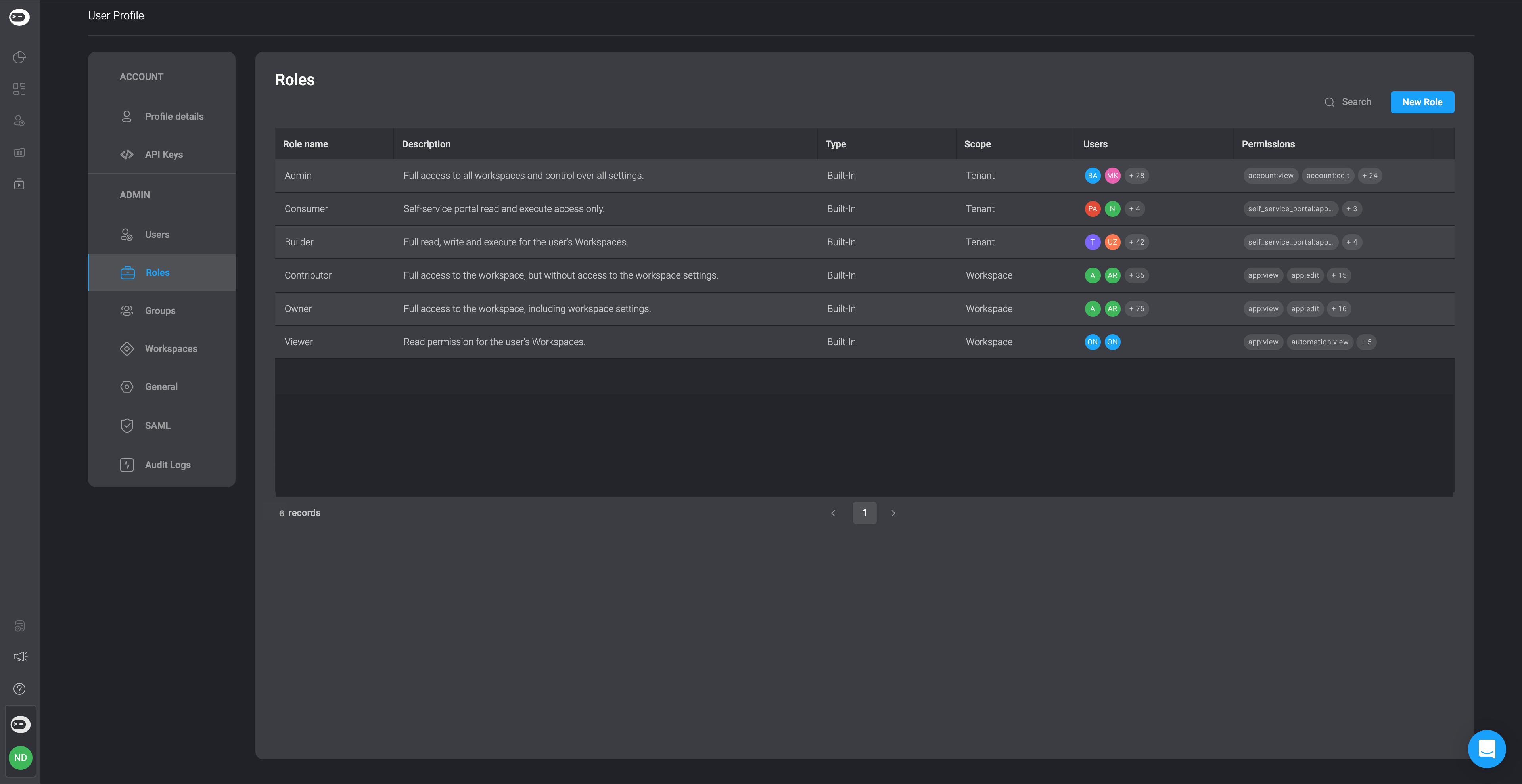
    Navigate to the 'Roles' Tab, in settings and in the top-right corner, click on 'New Role' button in the top right-corner.
    <Frame>
      <img src="https://mintcdn.com/blinkops-2/sb7Z70HzlwQjgWp7/img/CaseManagement/Roles.png?fit=max&auto=format&n=sb7Z70HzlwQjgWp7&q=85&s=7c6b4f1193d18bd1eafae22b1e38bbb9" width="3838" height="1978" data-path="img/CaseManagement/Roles.png" />
    </Frame>
  </Step>

  <Step>
    A dialogue box will open, displaying all user roles and their permissions.
  </Step>

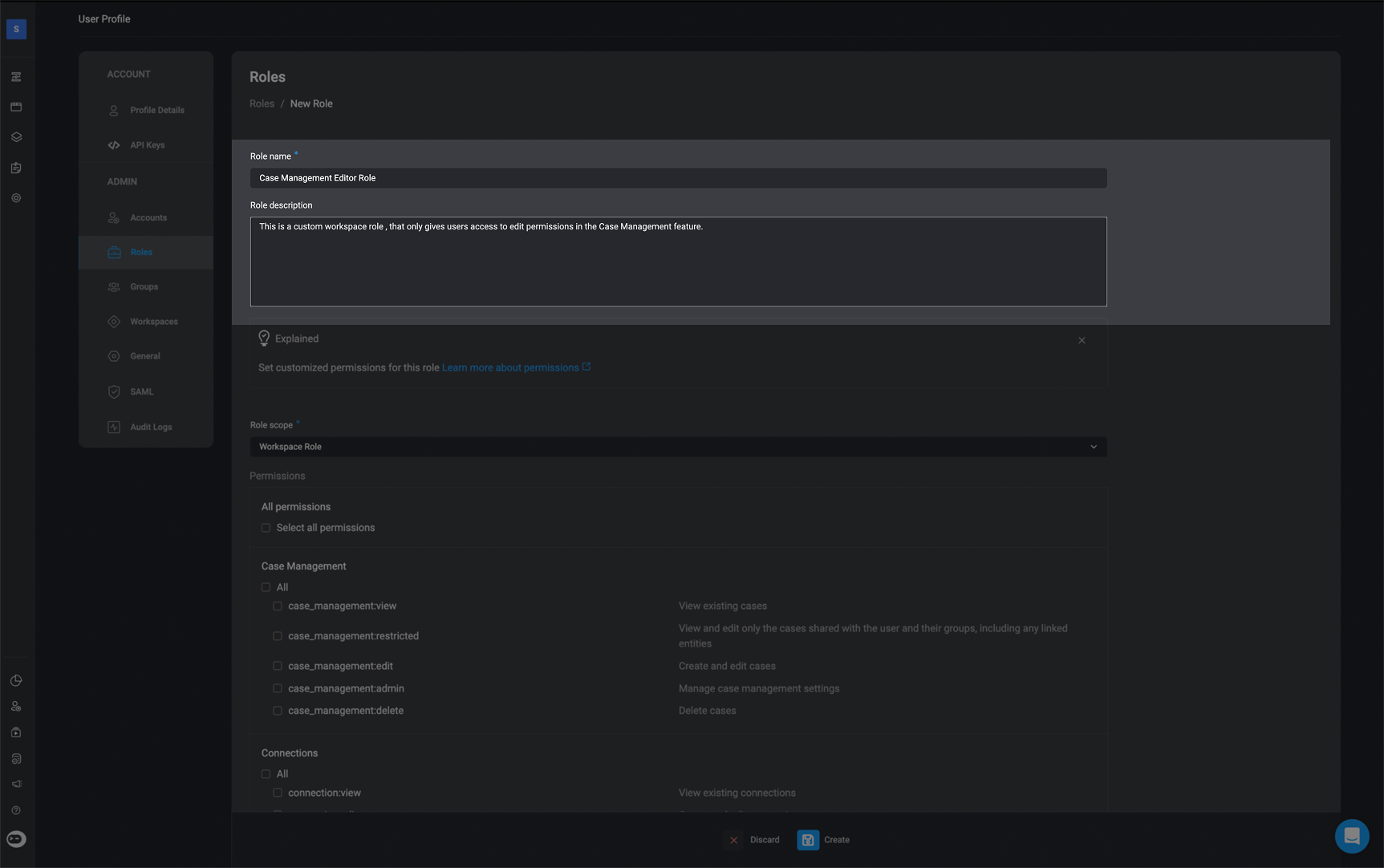
  <Step title="Fill in the Necessary Details">
    Add a **Role Name** and a **Role Description**.
    <Frame>
      <img src="https://mintcdn.com/blinkops-2/jkJg6KPC0uV-ty21/img/CaseManagement/CustomRole.png?fit=max&auto=format&n=jkJg6KPC0uV-ty21&q=85&s=c79d6f85d7adfdf7d372bba9c9e53030" width="1725" height="1082" data-path="img/CaseManagement/CustomRole.png" />
    </Frame>
  </Step>

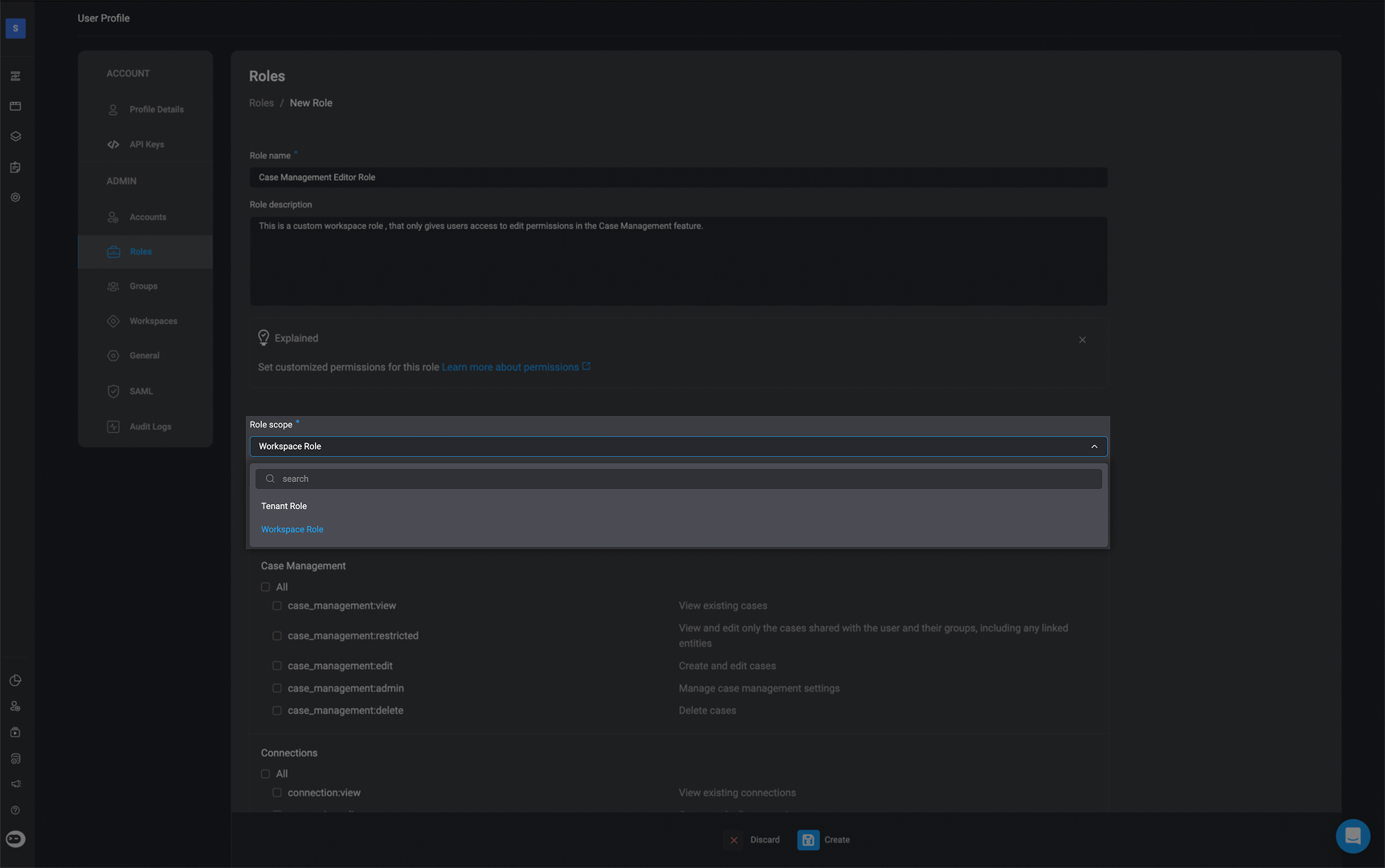
  <Step title="Choose the Workspace Role">
    Select the 'Workspace Role' option under the **Role Scope** section.
    <Frame>
      <img src="https://mintcdn.com/blinkops-2/wrPfqyb0-QUMOKmy/img/CaseManagement/WorkspaceRole.png?fit=max&auto=format&n=wrPfqyb0-QUMOKmy&q=85&s=d3fa181502877b500d5e05edecb427a9" width="1724" height="1081" data-path="img/CaseManagement/WorkspaceRole.png" />
    </Frame>
  </Step>

  <Step title="Choose Permissions">
    Choose permissions based on the custom role you wish to create
  </Step>
</Steps>

***

## Workspace Role Scope (Custom)

The roles outlined below are custom role configurations designed to help you get started with managing permissions in your workspace. These are recommended templates based on common user needs and responsibilities, particularly within the Case Management feature.

Use these custom roles as a baseline to guide your setup:

### SOC Analyst Role

Users assigned to the custom **Case Management SOC Analyst** user role can run workflows and manage cases but cannot edit workflows or system settings. They have full access to case creation and deletion, and read-only access to workflows, connections, and environment data.

The custom **SOC Analyst** role will use the built-in [Tenant Guest](/docs/blink-platform/account-management/roles#4-tenant-guest) role on the Tenant Scope.

<Accordion title="Workspace Scope Permissions" icon="up-down">
  <div>
    | Features         | Description                                                                                       | Scope                         | Access                       |
    | ---------------- | ------------------------------------------------------------------------------------------------- | ----------------------------- | ---------------------------- |
    | Case Management  | View existing cases                                                                               | case\_management:view         | <Icon icon="square-check" /> |
    | Case Management  | View and edit only the cases shared with the user and their groups, including any linked entities | case\_management:restricted   | <Icon icon="square" />       |
    | Case Management  | Create and edit cases.                                                                            | case\_management:edit         | <Icon icon="square-check" /> |
    | Case Management  | Close Case.                                                                                       | case\_management:close\_case  | <Icon icon="square" />       |
    | Case Management  | Delete Cases.                                                                                     | case\_management:delete\_case | <Icon icon="square" />       |
    | Case Management  | Manage case management settings.                                                                  | case\_management:admin        | <Icon icon="square" />       |
    | Connections      | View existing connections                                                                         | connections:view              | <Icon icon="square-check" /> |
    | Connections      | Create and edit connections                                                                       | connections:edit              | <Icon icon="square" />       |
    | Global Variables | View existing global variables                                                                    | global\_variables:view        | <Icon icon="square-check" /> |
    | Global Variables | Create and edit global variables                                                                  | global\_variables:edit        | <Icon icon="square" />       |
    | Runners          | View existing runners                                                                             | runners:view                  | <Icon icon="square-check" /> |
    | Runners          | Create and edit runners                                                                           | runners:edit                  | <Icon icon="square" />       |
    | Tables           | View existing tables                                                                              | tables:view                   | <Icon icon="square-check" /> |
    | Tables           | Create and edit tables                                                                            | tables:edit                   | <Icon icon="square" />       |
    | Workflows        | View existing workflows                                                                           | Workflow:view                 | <Icon icon="square-check" /> |
    | Workflows        | Publish Workflows                                                                                 | workflow:publish              | <Icon icon="square" />       |
    | Workflows        | Create and edit workflows                                                                         | workflow:edit                 | <Icon icon="square" />       |
    | Workflows        | Approve Workflows                                                                                 | workflow:approve              | <Icon icon="square" />       |
    | Workspaces       | Share workspaces resources                                                                        | workspaces:share              | <Icon icon="square" />       |
    | Workspaces       | Update workspace settings                                                                         | workspaces:edit               | <Icon icon="square" />       |
    | Workspaces       | Delete workspaces                                                                                 | workspaces:delete             | <Icon icon="square" />       |
  </div>
</Accordion>

***

### Builder Role

Users assigned to the custom **Case Management Builder** user role can fully create and modify workflows and cases. They have broad access to build workflows, edit workflows, approve workflows and manage case data but limited access to workspace configuration.

The custom **Case Management Builder** role will use the built-in [Builder](/docs/blink-platform/account-management/roles#3-builder) role on the Tenant Scope.

<Accordion title="Workspace Scope Permissions" icon="up-down">
  <div>
    | Features         | Description                                                                                       | Scope                         | Access                       |
    | ---------------- | ------------------------------------------------------------------------------------------------- | ----------------------------- | ---------------------------- |
    | Case Management  | View existing cases                                                                               | case\_management:view         | <Icon icon="square-check" /> |
    | Case Management  | View and edit only the cases shared with the user and their groups, including any linked entities | case\_management:restricted   | <Icon icon="square" />       |
    | Case Management  | Create and edit cases.                                                                            | case\_management:edit         | <Icon icon="square-check" /> |
    | Case Management  | Close Case.                                                                                       | case\_management:close\_case  | <Icon icon="square-check" /> |
    | Case Management  | Delete Cases.                                                                                     | case\_management:delete\_case | <Icon icon="square-check" /> |
    | Case Management  | Manage case management settings                                                                   | case\_management:admin        | <Icon icon="square" />       |
    | Connections      | View existing connections                                                                         | connections:view              | <Icon icon="square-check" /> |
    | Connections      | Create and edit connections                                                                       | connections:edit              | <Icon icon="square" />       |
    | Global Variables | View existing global variables                                                                    | global\_variables:view        | <Icon icon="square-check" /> |
    | Global Variables | Create and edit global variables                                                                  | global\_variables:edit        | <Icon icon="square" />       |
    | Runners          | View existing runners                                                                             | runners:view                  | <Icon icon="square-check" /> |
    | Runners          | Create and edit runners                                                                           | runners:edit                  | <Icon icon="square" />       |
    | Tables           | View existing tables                                                                              | tables:view                   | <Icon icon="square-check" /> |
    | Tables           | Create and edit tables                                                                            | tables:edit                   | <Icon icon="square" />       |
    | Workflows        | View existing workflows                                                                           | Workflow:view                 | <Icon icon="square-check" /> |
    | Workflows        | Publish Workflows                                                                                 | workflow:publish              | <Icon icon="square" />       |
    | Workflows        | Create and edit workflows                                                                         | workflow:edit                 | <Icon icon="square-check" /> |
    | Workflows        | Approve Workflows                                                                                 | workflow:approve              | <Icon icon="square-check" /> |
    | Workspaces       | Share workspaces resources                                                                        | workspaces:share              | <Icon icon="square" />       |
    | Workspaces       | Update workspace settings                                                                         | workspaces:edit               | <Icon icon="square" />       |
    | Workspaces       | Delete workspaces                                                                                 | workspaces:delete             | <Icon icon="square" />       |
  </div>
</Accordion>

***

### Admin Role

Users assigned the custom **Case Management Admin** user role can fully build and maintain workflows and case-related features like tables, runners, and global variables. They have full edit access across case and workflow objects but cannot configure workspace settings.

The custom **Case Management Admin** role will use the built-in [Admin](/docs/blink-platform/account-management/roles#1-admin) role on the Tenant Scope.

<Accordion title="Workspace Scope Permissions" icon="up-down">
  <div>
    | Features         | Description                                                                                       | Scope                         | Access                       |
    | ---------------- | ------------------------------------------------------------------------------------------------- | ----------------------------- | ---------------------------- |
    | Case Management  | View existing cases                                                                               | case\_management:view         | <Icon icon="square-check" /> |
    | Case Management  | View and edit only the cases shared with the user and their groups, including any linked entities | case\_management:restricted   | <Icon icon="square" />       |
    | Case Management  | Create and edit cases.                                                                            | case\_management:edit         | <Icon icon="square-check" /> |
    | Case Management  | Close Case.                                                                                       | case\_management:close\_case  | <Icon icon="square-check" /> |
    | Case Management  | Delete Cases.                                                                                     | case\_management:delete\_case | <Icon icon="square-check" /> |
    | Case Management  | Manage case management settings.                                                                  | case\_management:admin        | <Icon icon="square-check" /> |
    | Connections      | View existing connections                                                                         | connections:view              | <Icon icon="square-check" /> |
    | Connections      | Create and edit connections                                                                       | connections:edit              | <Icon icon="square" />       |
    | Global Variables | View existing global variables                                                                    | global\_variables:view        | <Icon icon="square-check" /> |
    | Global Variables | Create and edit global variables                                                                  | global\_variables:edit        | <Icon icon="square" />       |
    | Runners          | View existing runners                                                                             | runners:view                  | <Icon icon="square-check" /> |
    | Runners          | Create and edit runners                                                                           | runners:edit                  | <Icon icon="square" />       |
    | Tables           | View existing tables                                                                              | tables:view                   | <Icon icon="square-check" /> |
    | Tables           | Create and edit tables                                                                            | tables:edit                   | <Icon icon="square" />       |
    | Workflows        | View existing workflows                                                                           | Workflow:view                 | <Icon icon="square-check" /> |
    | Workflows        | Publish Workflows                                                                                 | workflow:publish              | <Icon icon="square" />       |
    | Workflows        | Create and edit workflows                                                                         | workflow:edit                 | <Icon icon="square-check" /> |
    | Workflows        | Approve Workflows                                                                                 | workflow:approve              | <Icon icon="square-check" /> |
    | Workspaces       | Share workspaces resources                                                                        | workspaces:share              | <Icon icon="square" />       |
    | Workspaces       | Update workspace settings                                                                         | workspaces:edit               | <Icon icon="square" />       |
    | Workspaces       | Delete workspaces                                                                                 | workspaces:delete             | <Icon icon="square" />       |
  </div>
</Accordion>

***
