> ## Documentation Index
> Fetch the complete documentation index at: https://docs.blinkops.com/llms.txt
> Use this file to discover all available pages before exploring further.
# Query Action
> Use query actions to search and filter case management records within Blink workflows.
## Query a Case Management Table
When querying a case management table using a condition, and you are using both the `in` operator, it is essential to use the `arr() function` when working with arrays. Failing to do so will cause the workflow action to fail.
**For Example**:
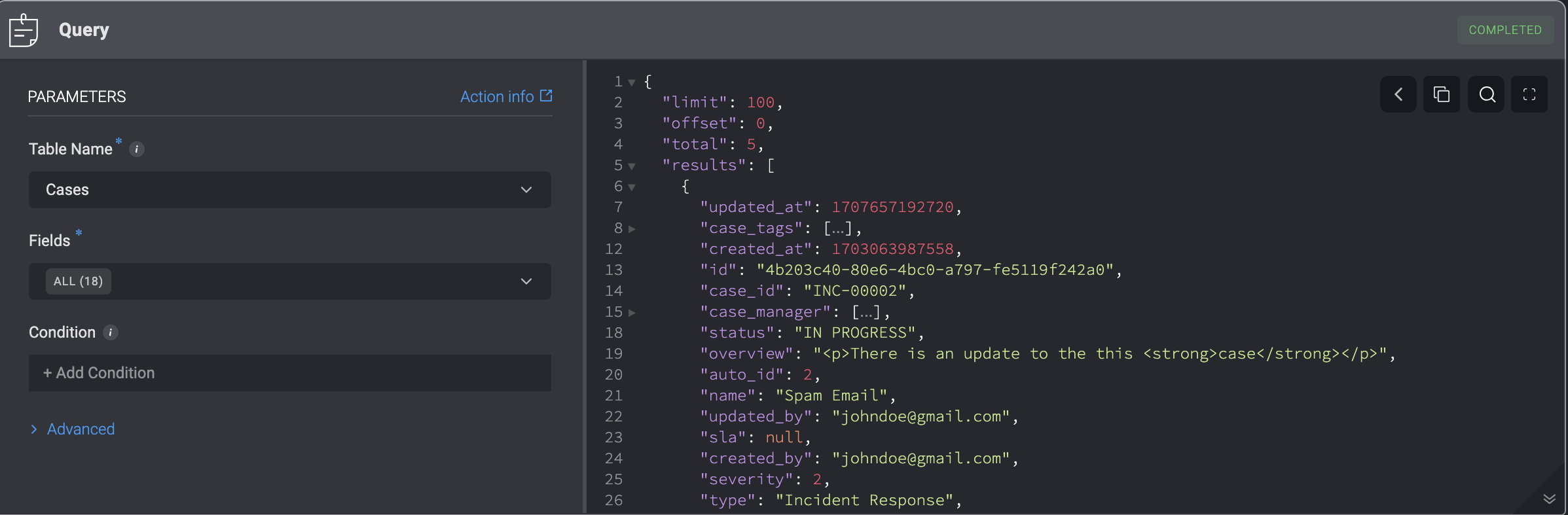
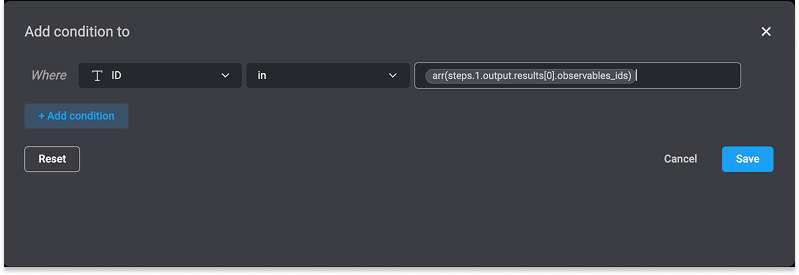 Query a Case Management Table by filling in the following parameters in the step.
| Parameter | Description |
| ------------------------- | ------------------------------------------------------------------------------- |
| Table Name | Type of Table: **Alerts, Attachments, Cases, Custom Table, Observables, Tasks** |
| Fields | Field Types |
| Condition (Optional) | Condition that compares two Case Management table field values. |
| Advanced-Limit (Optional) | Query Limit |
 ***
## Query a Case Management Table using SQL
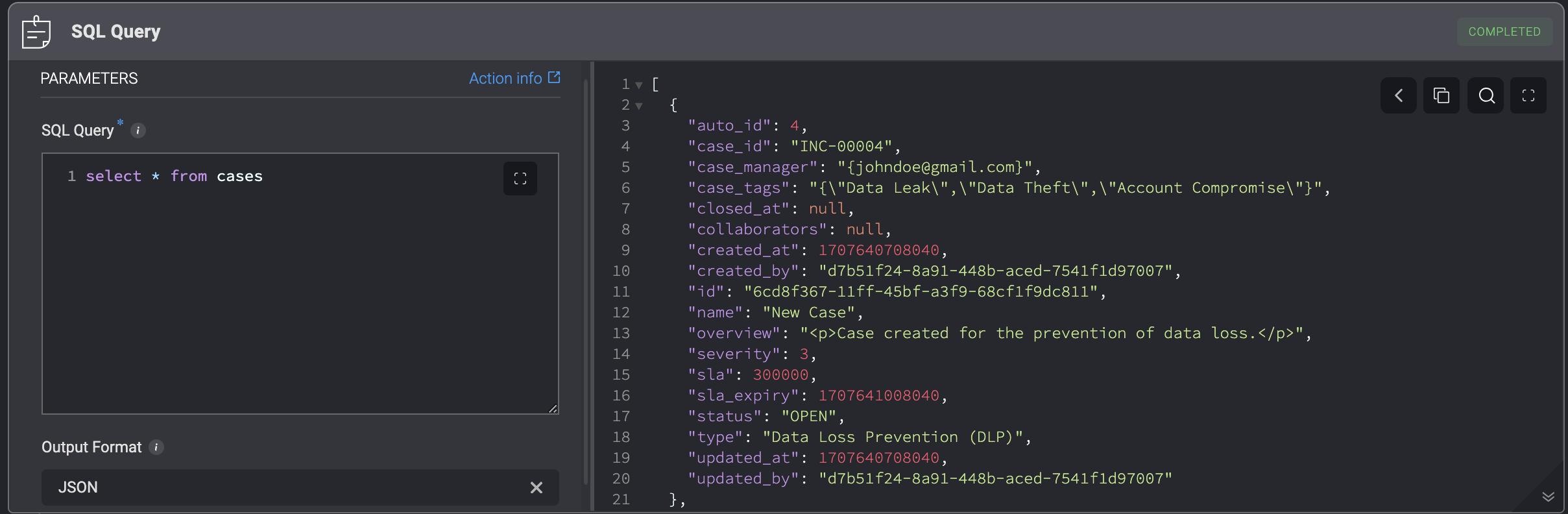
Query a Case Management Table using SQL by filling in the following parameters in the step.
***
## Query a Case Management Table using SQL
Query a Case Management Table using SQL by filling in the following parameters in the step.
| Parameter | Description |
| ------------- | --------------------------------------------------- |
| SQL Query | The SQL Query |
| Output Format | Output Format Types: **Table**, **CSV** or **JSON** |
Please note that you need to use table and column names and not display names. [Down below](#list-of-tables), is the full list of table and column names mapped to their display names.
To query associated cases linked to fields across different tables, use the following SQL query:
**To fetch related record objects (e.g., full rows like id, name) for each case:**
```sql theme={"dark"}
SELECT
c.id AS case_id,
json_agg(
json_build_object(
'id', a.id,
'name', a.name
)
) AS
FROM cases c
JOIN records_relations rr
ON (
(rr.record_id_a = c.id AND rr.table_name_a = 'cases' AND rr.table_name_b = '') OR
(rr.record_id_b = c.id AND rr.table_name_b = 'cases' AND rr.table_name_a = '')
)
JOIN
ON (
(.id = rr.record_id_a AND rr.table_name_a = '') OR
(.id = rr.record_id_b AND rr.table_name_b = '')
)
GROUP BY c.id;
```
***
**To fetch only the related record IDs instead of full objects:**
```sql theme={"dark"}
SELECT
c.id AS case_id,
json_agg(
CASE
WHEN rr.table_name_a = '' THEN rr.record_id_a
ELSE rr.record_id_b
END
) AS _ids
FROM cases c
JOIN records_relations rr
ON (
(rr.table_name_a = 'cases' AND rr.record_id_a = c.id AND rr.table_name_b = '') OR
(rr.table_name_b = 'cases' AND rr.record_id_b = c.id AND rr.table_name_a = '')
)
GROUP BY c.id;
```
**Note**: Replace `` with the actual table name that is associated with the cases.
For example, to fetch alert records with selected fields attached to each case, you can use the following SQL query:
```sql theme={"dark"}
SELECT
c.id AS case_id,
json_agg(
json_build_object(
'id', a.id,
'name', a.name
)
) AS alerts
FROM cases c
JOIN records_relations rr
ON (
(rr.record_id_a = c.id AND rr.table_name_a = 'cases' AND rr.table_name_b = 'alerts') OR
(rr.record_id_b = c.id AND rr.table_name_b = 'cases' AND rr.table_name_a = 'alerts')
)
JOIN alerts a
ON (
(a.id = rr.record_id_a AND rr.table_name_a = 'alerts') OR
(a.id = rr.record_id_b AND rr.table_name_b = 'alerts')
)
GROUP BY c.id;
```
***
**To fetch only the alert IDs attached to each case, you can use the following SQL query**
```sql theme={"dark"}
SELECT
c.id AS case_id,
json_agg(
CASE
WHEN rr.table_name_a = 'alerts' THEN rr.record_id_a
ELSE rr.record_id_b
END
) AS alert_ids
FROM cases c
JOIN records_relations rr
ON (
(rr.table_name_a = 'cases' AND rr.record_id_a = c.id AND rr.table_name_b = 'alerts') OR
(rr.table_name_b = 'cases' AND rr.record_id_b = c.id AND rr.table_name_a = 'alerts')
)
GROUP BY c.id;
```
***
### List of Tables
#### Cases
| Name | Display Name |
| -------------------- | ------------------ |
| case\_id | Case ID |
| type | Case Type |
| severity | Severity |
| name | Name |
| summary | Summary |
| created\_at | Created At |
| case\_manager | Case Manager |
| status | Status |
| linked\_observables | Linked Observables |
| close\_reason | Close Reason |
| closed\_at | Closed At |
| closed\_by | Closed By |
| closed\_by\_workflow | Closed By Workflow |
| collaborators | Collaborators |
| created\_by | Created By |
| linked\_alerts | Linked Alerts |
| linked\_attachments | Linked Attachments |
| linked\_cases | Linked Cases |
| linked\_tasks | Linked Tasks |
| mitre\_attack | Mitre Attack |
| response | Response |
| sla | SLA |
| sla\_expiry | SLA Expiry |
| case\_tags | Tags |
| created\_at | Created At |
| vendors | Vendors |
***
#### Observables
| Name | Display Name |
| ---------------- | ------------------ |
| created\_by | Created By |
| content | Content |
| enrichment\_data | Enrichment Data |
| updated\_at | Updated At |
| case\_ids | Linked Cases |
| attachment\_ids | Linked Attachments |
| task\_ids | Linked Tasks |
| name | Name |
| type | Observable Type |
| description | Description |
| verdict | Verdict |
| alert\_ids | Linked Alerts |
| id | ID |
| updated\_by | Updated By |
| observable\_id | Observable ID |
| auto\_id | Observable Number |
| observable\_ids | Linked Observables |
***
#### Alerts
| Name | Display Name |
| ---------------- | ------------------ |
| processed | Processed |
| id | ID |
| updated\_at | Updated At |
| created\_by | Created By |
| updated\_by | Updated By |
| observable\_ids | Linked Observables |
| template\_exists | Template Exists |
| severity | Severity |
| response | Response |
| alert\_id | Alert ID |
| case\_ids | Linked Cases |
| type | Alert Type |
| name | Name |
| vendor | Vendor |
| event | Event |
| description | Description |
| attachment\_ids | Linked Attachments |
***
#### Attachments
| Name | Display Name |
| --------------- | ------------------ |
| updated\_at | Updated At |
| created\_by | Created By |
| updated\_by | Updated By |
| id | ID |
| alert\_ids | Linked Alerts |
| attachment | Attachment |
| attachment\_id | Attachment ID |
| case\_ids | Linked Cases |
| description | Description |
| name | Name |
| response | Response |
| task\_ids | Linked Tasks |
| type | Attachment Type |
| menu | Menu |
| observable\_ids | Linked Observables |
| created\_at | Created At |
***
#### Tasks
| Name | Display Name |
| --------------- | ----------------------------- |
| updated\_at | Updated At |
| id | ID |
| created\_by | Created By |
| updated\_by | Updated By |
| created\_at | Created At |
| observable\_ids | Linked Observables |
| is\_blocking | Block closing case until done |
| description | Description |
| closed\_at | Closed At |
| case\_ids | Linked Cases |
| task\_id | Task ID |
| due\_date | Due date |
| task\_ids | Linked Tasks |
| name | Name |
| status | Status |
| alert\_ids | Linked Alerts |
| priority | Priority |
***
#### Custom Tables
If you're using custom tables, please follow the [Query a Table Using SQL docs](https://docs.blinkops.com/docs/blink-platform/tables/tables-in-workflows#query-a-table-using-sql) to fetch the correct table scheme.
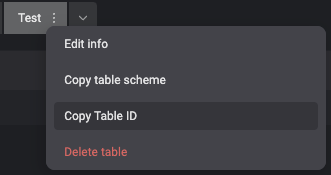
You can get the full table name via the **Copy Table ID** button:
 ***
***