> ## Documentation Index
> Fetch the complete documentation index at: https://docs.blinkops.com/llms.txt
> Use this file to discover all available pages before exploring further.
# Error Handling Workflow
> Handle errors in automated case management workflows, including missing template notifications and recovery.
## Subflow - Missing Alert Template Notification
For more information about 'Observable Extraction Rules' (template) errors, navigate [here](/docs/case-management/blinks-automated-case-management/alert-processing/extract-observables-action#troubleshooting-observable-extraction-action)
The "Subflow - Missing Alert Template" workflow is an on-demand process designed to notify internal recipients when there is an error with an observable extraction rule (template) in the [Extract Observable Action](/docs/case-management/blinks-automated-case-management/alert-processing/extract-observables-action)
Specifically, it handles situations where:
* A required alert template is missing
* An alert template is misconfigured (bad template)
* A general alert error occurs
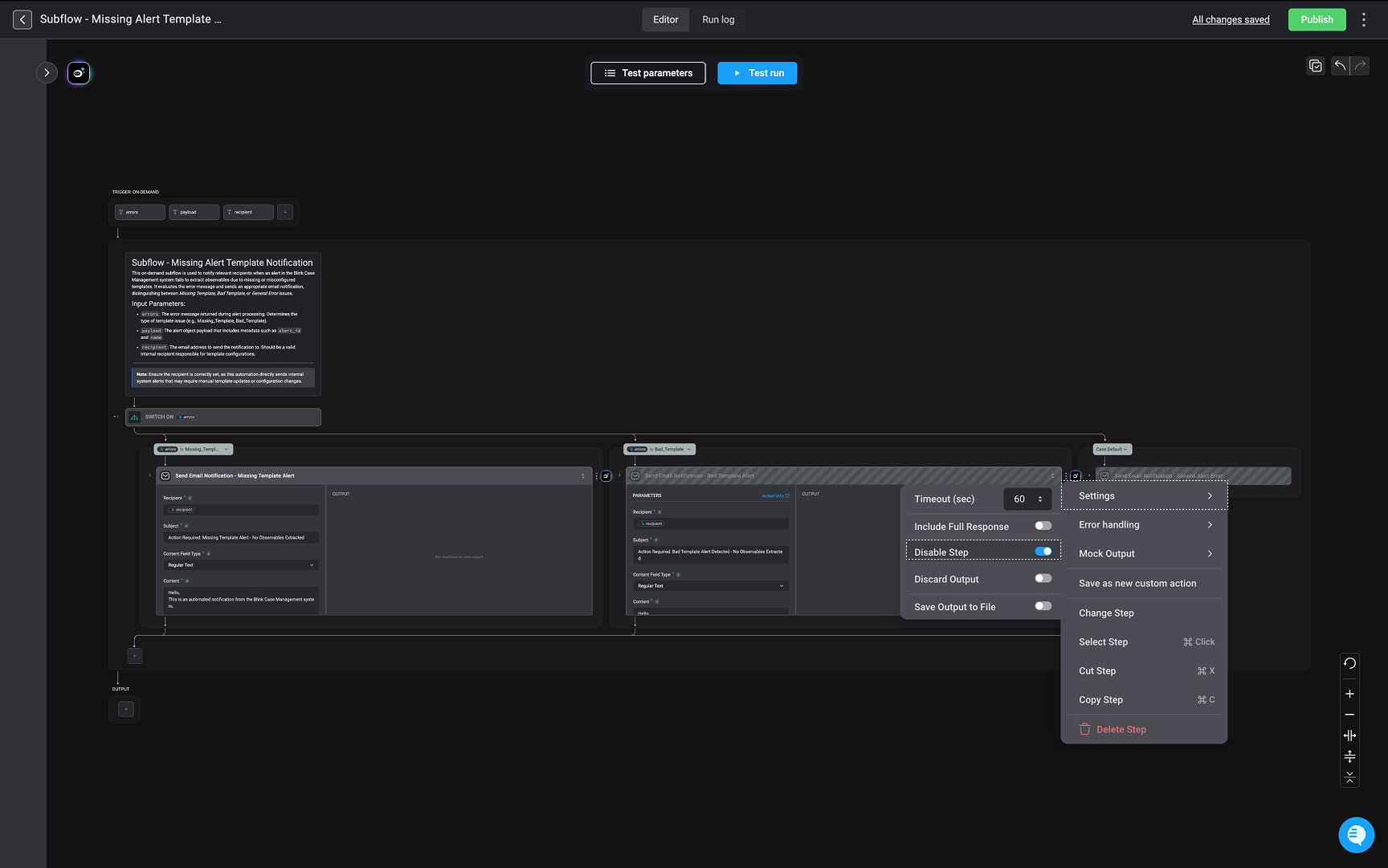
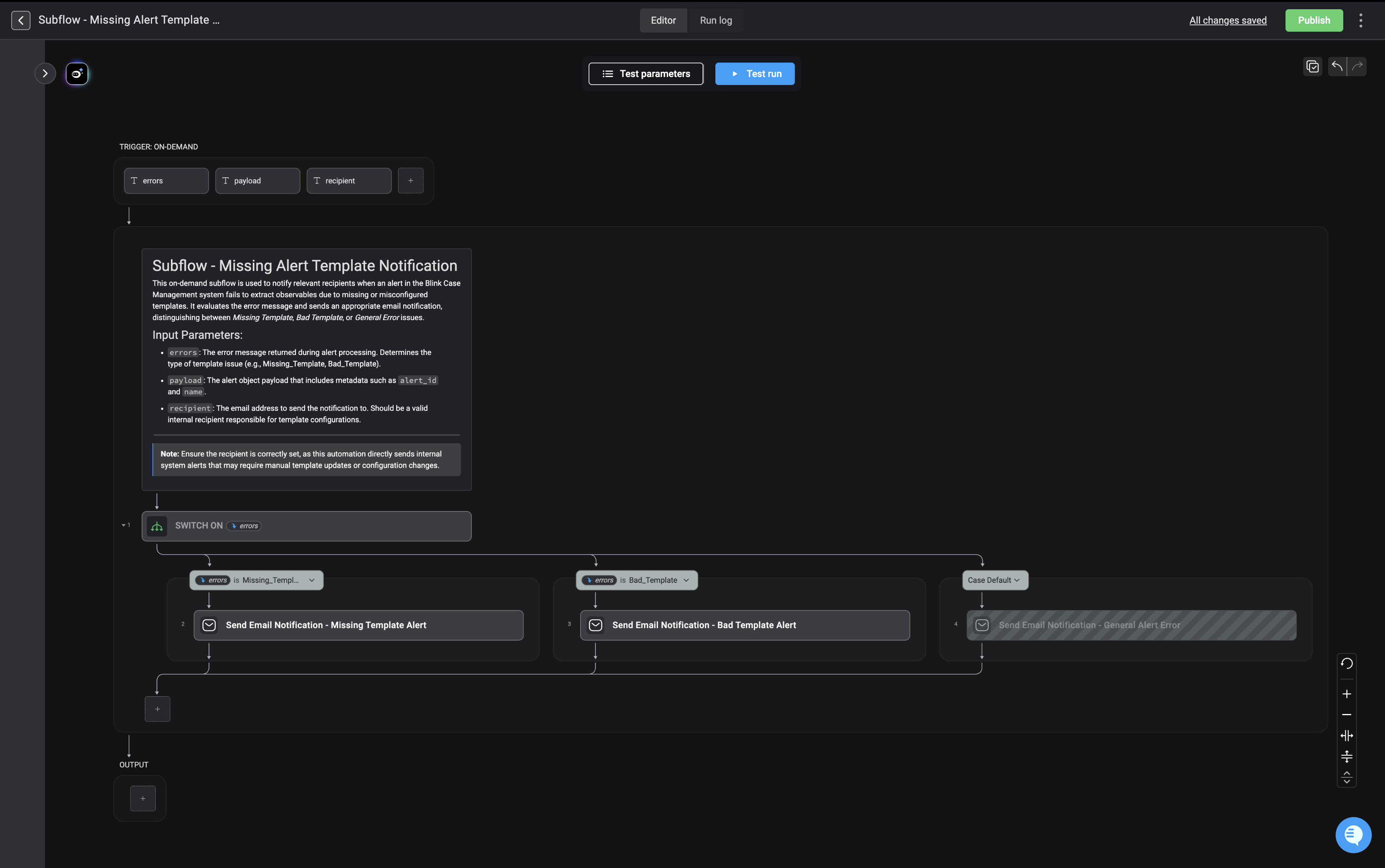 The workflow identifies the type of error and automatically sends the corresponding email notification to the appropriate recipient. You can customize which notifications are sent by enabling or disabling them in the step settings of the selected step to match your requirements.
 ***
# Trigger Section
### Trigger Type: On-Demand
The subflow expects three input parameters:
### 1. `errors`
* The error message returned during alert processing.
* Determines the classification of the issue.
* Example values:
* `Missing_Template`
* `Bad_Template`
* Other general error types
This parameter is the key driver for the branching logic.
### 2. `payload`
* The full alert object payload.
* Contains metadata such as:
* `alert_id`
* `name`
* Any other contextual information needed for notification.
### 3. `recipient`
* The internal email address that will receive the notification.
* Must be a valid email address.
* Typically assigned to someone responsible for maintaining or configuring templates.
***
# Main Logic: Switch on `errors`
After receiving the inputs, the workflow uses a **Switch condition** on the `errors` parameter.
This acts like a decision tree:
* It evaluates the value of `errors`
* Routes execution to the matching branch
***
## Branch 1: Missing Template
**Condition:**
`errors` is `Missing_Template`
**Action:**
Send Email Notification – Missing Template Alert
This email informs the recipient that:
* A required alert template does not exist
* Manual intervention may be required to create or restore it
***
## Branch 2: Bad Template
**Condition:**
`errors` is `Bad_Template`
**Action:**
Send Email Notification – Bad Template Alert
This email informs the recipient that:
* The template exists
* But it is misconfigured, malformed, or invalid
* Configuration needs to be reviewed and corrected
***
## Branch 3: Default Case (General Error)
**Condition:**
Any other error value not matching the first two cases
**Action:**
Send Email Notification – General Alert Error
This ensures:
* No alert failure goes unnoticed
* Even unclassified or unexpected errors are reported
* There is a safety net for edge cases
***
# Output
After sending the appropriate email notification, the subflow completes execution. There are no additional transformations or returned values shown in this design.
***
# Trigger Section
### Trigger Type: On-Demand
The subflow expects three input parameters:
### 1. `errors`
* The error message returned during alert processing.
* Determines the classification of the issue.
* Example values:
* `Missing_Template`
* `Bad_Template`
* Other general error types
This parameter is the key driver for the branching logic.
### 2. `payload`
* The full alert object payload.
* Contains metadata such as:
* `alert_id`
* `name`
* Any other contextual information needed for notification.
### 3. `recipient`
* The internal email address that will receive the notification.
* Must be a valid email address.
* Typically assigned to someone responsible for maintaining or configuring templates.
***
# Main Logic: Switch on `errors`
After receiving the inputs, the workflow uses a **Switch condition** on the `errors` parameter.
This acts like a decision tree:
* It evaluates the value of `errors`
* Routes execution to the matching branch
***
## Branch 1: Missing Template
**Condition:**
`errors` is `Missing_Template`
**Action:**
Send Email Notification – Missing Template Alert
This email informs the recipient that:
* A required alert template does not exist
* Manual intervention may be required to create or restore it
***
## Branch 2: Bad Template
**Condition:**
`errors` is `Bad_Template`
**Action:**
Send Email Notification – Bad Template Alert
This email informs the recipient that:
* The template exists
* But it is misconfigured, malformed, or invalid
* Configuration needs to be reviewed and corrected
***
## Branch 3: Default Case (General Error)
**Condition:**
Any other error value not matching the first two cases
**Action:**
Send Email Notification – General Alert Error
This ensures:
* No alert failure goes unnoticed
* Even unclassified or unexpected errors are reported
* There is a safety net for edge cases
***
# Output
After sending the appropriate email notification, the subflow completes execution. There are no additional transformations or returned values shown in this design.