> ## Documentation Index
> Fetch the complete documentation index at: https://docs.blinkops.com/llms.txt
> Use this file to discover all available pages before exploring further.

# Extract Observables

> Configure observable extraction actions to identify key data points from alerts in Blink case management.

export const VersionBadges = () => {
  return <div>
     <span className="inline-flex items-center rounded-md bg-blue-50 px-2 py-1 text-xs font-medium text-blue-700 ring-1 ring-blue-700/10 ring-inset">
       v9.0
      </span>
    </div>;
};

<VersionBadges />

## The Extract Observables Action

[Observables](/docs/case-management/observables/observables) are data points found within alerts that represent potential indicators of malicious activity, such as IP addresses, URLs, file hashes, hostnames, and usernames. These pieces of information are essential for understanding what an alert is about, where it originated, and how it might relate to other activity in the environment.

The **Extract Observables** action plays a foundational role in the [alert processing](/docs/case-management/blinks-automated-case-management/alert-processing/alert-processing#on-new-table-record--process-alert) workflow by automatically parsing incoming alert payloads and extracting these critical observables, along with any detectable relationships between them. By turning unstructured alert data into actionable intelligence early in the workflow, this action sets the stage for effective enrichment, correlation, triage, and automated response.

<Frame>
  <img src="https://mintcdn.com/blinkops-2/BRfSL_EOO1Uh43ic/img/CaseManagement/ExtractObservables9.png?fit=max&auto=format&n=BRfSL_EOO1Uh43ic&q=85&s=0e6c8280cfd2f0a1ff2ba2caa4ddf326" width="1726" height="1077" data-path="img/CaseManagement/ExtractObservables9.png" />
</Frame>

***

## How it Works

1. **Alert Processing and Initialization**
   * When a new alert is added to the [Alerts Table](/docs/case-management/alerts/alerts), its Alert ID is received, and the system retrieves its associated payload. This payload is then processed to extract key observables and its relations (if they exist) systematically, ensuring all relevant data points are captured for further analysis.

2. **Template-Based Parsing**
   * Using predefined **Observable Extraction Rules** in **Case Management Settings**, the system identifies specific alert payload fields that contain observables. Each rule maps payload keys (e.g., `device.external_ip`) to their corresponding observable types (e.g., **IP Address**), ensuring structured and consistent extraction.

3. **Extraction and Validation**

   * Once identified, it then verifies whether each extracted observable is valid and unique, preventing duplicates and filtering out irrelevant data.

   <Tip> Navigate [here](/docs/case-management/blinks-automated-case-management/observable-extraction-rules#observable-extraction-logic) for a more detailed explanation of observable extraction logic. </Tip>

4. **Creating and Linking Observables**

   * **Create Observables:** If the **Create Observables** option is enabled, extracted observables are added to the [Observables Table](/docs/case-management/observables/observables), categorized by type (e.g., **IP addresses**, **usernames**).
   * **Link Existing Observables:** If the **Link Existing Observables** option is enabled, the extracted observables are linked to the alert record, associating them with existing data for further investigation.

   <Tip> For best results, we strongly recommend enabling both 'Create Observables' and 'Link Existing Observables' options. </Tip>

<Accordion title="Extract Observables Action Fields" icon="up-down">
  <div className="integrations-table">
    | Parameter                      | Description                                                                                                                                                                                                              |
    | ------------------------------ | ------------------------------------------------------------------------------------------------------------------------------------------------------------------------------------------------------------------------ |
    | **Alert ID**                   | The Alert ID received from the incoming alert payload                                                                                                                                                                    |
    | **Create Observables:**        | If the **Create Observables** option is enabled, extracted observables are added to the [Observables Table](/docs/case-management/observables/observables), categorized by type (e.g., **IP addresses**, **usernames**). |
    | **Link Existing Observables:** | If the **Link Existing Observables** option is enabled, the extracted observables are linked to the alert record, associating them with existing data for further investigation.                                         |
  </div>
</Accordion>

***

## 'Extract Observables' Action Output

When the 'Extract Observables' action is executed, the output is returned in a structured JSON format. This output provides detailed information about the observable extraction process, including the following key fields:
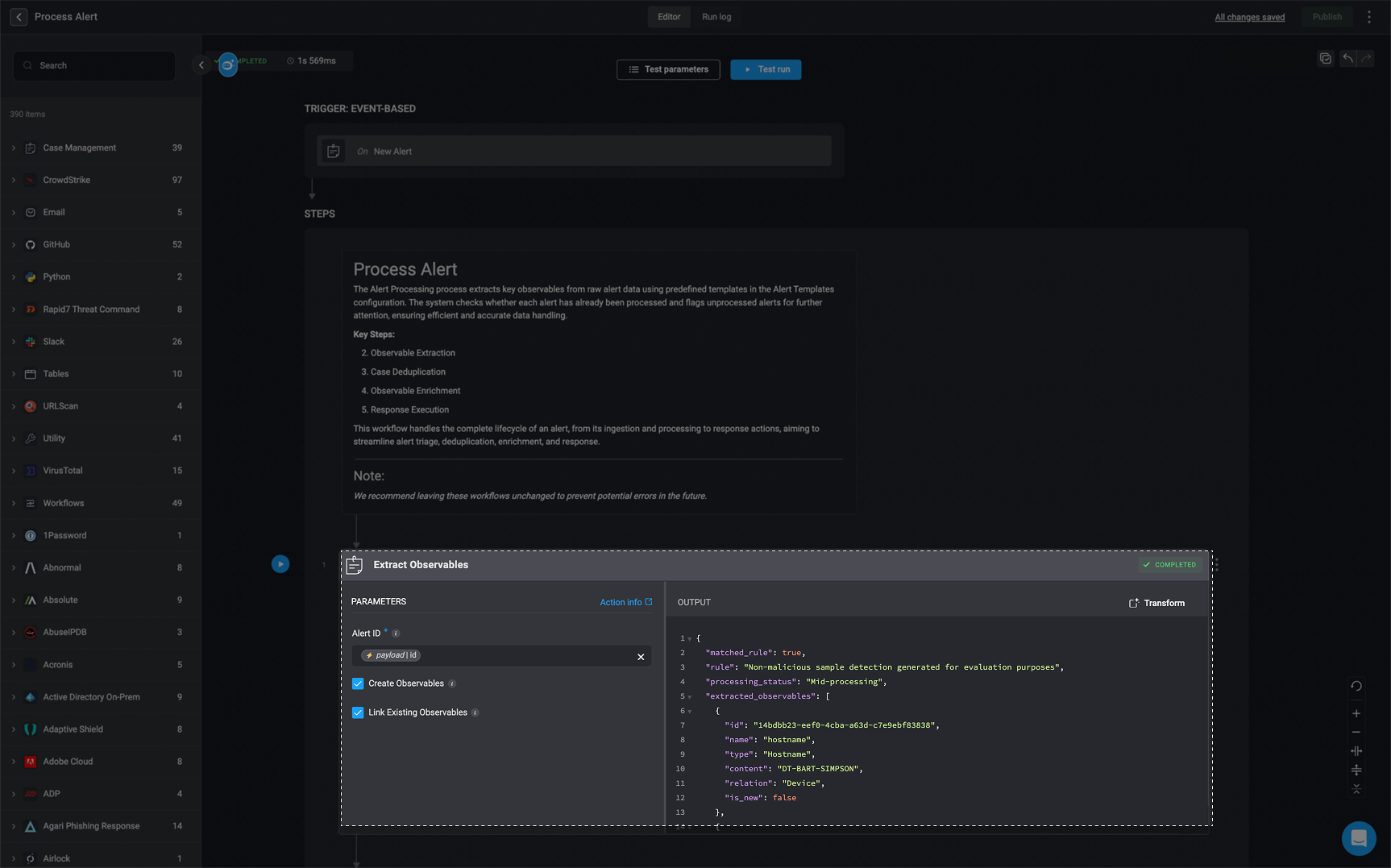
<Note> **Note:** The following images and `JSON` outputs are provided for illustrative purposes only. The actual results you see may vary depending on how you have configured the [**Extract Observables**](#extract-observables) action and the associated [**Extract Observable Rules**](/docs/case-management/blinks-automated-case-management/observable-extraction-rules).</Note>

<Accordion title="Extract Observables Output Example" icon="up-down">
  ```json theme={"dark"}
  {
    "matched_rule": true,
    "rule": "False Executable",
    "processing_status": "Mid-processing",
    "extracted_observables": [
      {
        "id": "9785b8cf-555c-4969-b0b8-cbeae5791d3f",
        "name": "agent_id",
        "type": "Device Agent ID",
        "content": "cdd5be18804244df8b849069294563e4",
        "relation": "Target Device",
        "is_new": false
      },
      {
        "id": "7fbff996-e653-4f80-9efa-ab6b2a00a525",
        "name": "external_ip",
        "type": "IP Address",
        "content": "180.112.146.250",
        "relation": "Attacker IP Address",
        "is_new": false
      },
      {
        "id": "045cb3b7-68e8-43e2-9ebd-64d210b08615",
        "name": "hostname",
        "type": "Hostname",
        "content": "DT-BART-SIMPSON",
        "relation": "Target Host",
        "is_new": false
      },
      {
        "id": "a0a8f04c-8181-4f5b-acd5-1d43996251f7",
        "name": "local_ip",
        "type": "IP Address",
        "content": "192.168.0.81",
        "relation": "Target IP Address",
        "is_new": false
      },
      {
        "id": "e2016490-a6c5-43a5-8f6f-21e786d2bcaa",
        "name": "sha256",
        "type": "File Hash",
        "content": "298a078b749c97d3a4523e89969deb51b0b779adb7f65b4aec32120200257790",
        "relation": "Parent Process Hash",
        "is_new": false
      },
      {
        "id": "8aee406f-d970-4839-ba99-49daf34199b2",
        "name": "sha256",
        "type": "File Hash",
        "content": "8d3f68b16f0710f858d8c1d2c699260e6f43161a5510abb0e7ba567bd72c965b",
        "relation": "",
        "is_new": false
      },
      {
        "id": "386e5762-340a-4629-b49a-8018a34299c2",
        "name": "user_name",
        "type": "Username",
        "content": "sam.gamgee",
        "relation": "Target User",
        "is_new": false
      },
      {
        "id": "bca048c7-eeef-4125-ad5e-f2b4a620eeff",
        "name": "user_principal",
        "type": "Username",
        "content": "sam.gamgee@gardens.nz",
        "relation": "Target User",
        "is_new": false
      }
    ],
    "new_observables": [],
    "case_type": "Malware",
    "log": [
      "Malware-Rule"
    ]
  }
  ```
</Accordion>

<Accordion title="Breakdown of the `JSON` Key-Value Pairs" icon="up-down">
  **`matched_rule`** : Indicates whether the alert matched an existing Observable Extraction Rule.

  **`rule`**: The name of the rule that was matched, if applicable.

  **`processing_status`**: Represents the current state of the observable extraction workflow.

  * **Unprocessed** – The alert has not yet gone through observable extraction or any related processing.
  * **Missing Template** – No matching Observable Extraction Rule was found for this alert, meaning the system doesn’t know how to extract observables from its structure.
  * **Mid-processing** – The alert is currently being processed. Observable extraction or case deduplication is still in progress.
  * **Bad Template** – A matching Observable Extraction Rule was found, but the system failed to extract any observables because the expected fields (defined in the rule) were not present in the alert's data. This status is only assigned if `0` observables were extracted.
  * **Processed** – The alert has successfully completed observable extraction and case deduplication.
    <Note>In the Extract Observable action, if both the Create Observable and Link Existing Observables checkboxes are left unchecked, the `processing_status` field will be omitted from the output. As a result, the processing status will not be updated when the action is executed.</Note>

  **`extracted_observables`**: A list of observables that were successfully extracted from the alert. Each observable object contains the following attributes:

  * `id`: A unique identifier for the observable.
  * `name`: The logical name of the observable (e.g., `agent_id`).
  * `type`: The classification of the observable (e.g., `Device Agent ID`).
  * `content`: The extracted value or identifier (e.g., a hash, string, or ID).
  * `relation`: The context in which the observable is associated with the alert (e.g., `Target Device`).
  * `is_new`: A boolean value that indicates whether the observable was newly extracted during alert processing. If set to `true`, the observable is considered new and will be included in the `new_observables` array at the bottom of the JSON output. If set to `false`, the observable already existed in the system and will not appear in the `new_observables` list.

  **`new_observables`**: \[] – This array contains only observables marked with `is_new: true`. An observable is considered new and included here only if an identical observable (based on its `content` value) does not already exist in the system. This ensures that duplicate observables are not reprocessed.

  **`case_type`**: The case type defines the classification or category assigned to the case that was generated from the alert. This value is typically determined based on the matched rule.

  * **`log`**: Displays the rule selection process during deduplication. It lists additional rules that were considered but not applied because a more suitable rule was chosen for the extracted observable in the case match. This visibility helps users understand how rules are applied and supports easier self-service troubleshooting. If no additional rules are found, the field remains an empty string.
    <Note>The system selects the most appropriate rule based on the Alert Name. When multiple rules could match, the rule with the longest matching string is prioritized, and exact matches take precedence over regular expression (regex) patterns.</Note>
</Accordion>

<Frame>
  <img src="https://mintcdn.com/blinkops-2/BRfSL_EOO1Uh43ic/img/CaseManagement/ExtractObservableOutputExample.png?fit=max&auto=format&n=BRfSL_EOO1Uh43ic&q=85&s=9bbddcca79348024694ea517b339b171" width="1162" height="396" data-path="img/CaseManagement/ExtractObservableOutputExample.png" />
</Frame>

***

## Troubleshooting Observable Extraction Action

When observable extraction action fails or produces unexpected results, it is important to understand how blink processes and maps observables based on the alert payload's data and [configured deduplication rules](/docs/case-management/blinks-automated-case-management/observable-extraction-rules) (templates).

When troubleshooting observable extraction, there are several key fields and scenarios to consider that can help you understand what went wrong:

* **Missing Template**: The action may have failed because it couldn't find a matching extraction template.

* **Invalid Template:** A template was found, but it failed to extract any observables, this typically indicates an issue with the template logic.

* **Partial Extraction** Only a subset of observables was extracted, even though the template mapping includes more. This could be due to how the data was structured or how the extraction rules were defined.

* **Duplicate Observable Content (edge case):** In some cases, an observable’s content may already exist in another observable. If so, the observable linked to the alert will retain the original observable type already associated with that content.

* **Extraction Limit (edge case)**: If there are more than `100 observables` to extract from a single alert, the system will not extract any. This is a built-in size limit.

***

### 'Extract Observables' Action – Use Case Example
<Accordion title="'Extract Observables' Action – Suspicious File Execution Detected" icon="circle-1">
  **Case Summary: Suspicious File Execution Detected**

  CrowdStrike Falcon Insight has flagged a potential malware incident involving **whoami.rtf**, a file executed on **DESKTOP-HLLEERH** by user **bart.s** from the **/Users/wilder/** directory. The execution method—**command-line invocation (`./whoami.rtf`)**—is suspicious since **RTF files are not meant to be executable**. This suggests **Masquerading**, where attackers disguise malicious files to bypass security measures.

  The file's execution indicates a possible attempt to **gather system information** using the `whoami` command. Further investigation is needed to assess the impact and mitigate risks.

  ***

  **[Alert Ingestion](/docs/case-management/blinks-automated-case-management/alert-ingestion)**

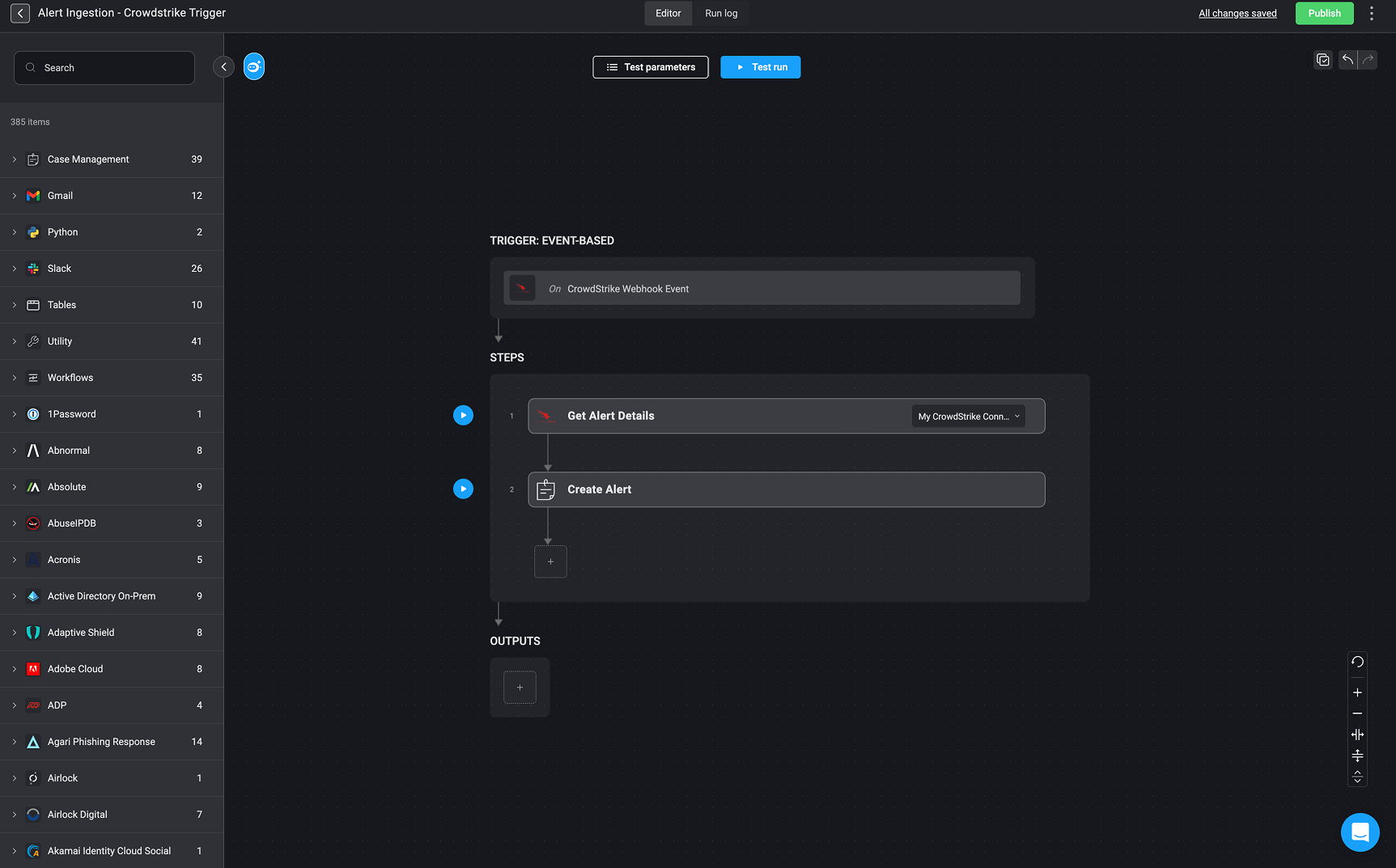
  **Step 1: Create an Alert Record**

  To begin handling this case, start by triggering the [Alert Ingestion](/docs/case-management/blinks-automated-case-management/alert-ingestion) workflow. When the workflow runs successfully, it will create a new Alert and populate its details in the Alert Table. This allows security teams to track the incident, correlate it with other related alerts, and take appropriate action efficiently.

  <Accordion title="Click here to view the full Alert's Payload" icon="up-down">
    ```js theme={"dark"}
    {
      "agent_id": "cdd5be18804244df8b849069294563e4",
      "aggregate_id": "aggind:bc44a7a3e758465f857867dcf4ac8c17:565469335392665337",
      "alleged_filetype": "rtf",
      "cid": "5686234480df4be090fbcf044a2708d4",
      "cloud_indicator": false,
      "cmdline": "./whoami.rtf",
      "composite_id": "5686234480df4be090fbcf044a2708d4:ind:bc44a7a3e758465f857867dcf4ac8c17:565469335361356727-145-335777",
      "confidence": 50,
      "context_timestamp": "2024-07-24T15:25:00.113Z",
      "control_graph_id": "ctg:bc44a7a3e758465f857867dcf4ac8c17:565469335392665337",
      "crawled_timestamp": "2024-07-24T19:24:30.660636531Z",
      "created_timestamp": "2024-07-24T15:26:04.807574447Z",
      "data_domains": [
        "Endpoint"
      ],
      "description": "An executable was run with a contradicting file extension",
      "device": {
        "agent_load_flags": "0",
        "agent_local_time": "2024-07-16T13:16:41.364Z",
        "agent_version": "7.17.18604.0",
        "cid": "5686234480df4be090fbcf044a2708d4",
        "config_id_base": "65994763",
        "config_id_build": "18604",
        "config_id_platform": "4",
        "device_id": "bc44a7a3e758465f857867dcf4ac8c17",
        "external_ip": "180.112.146.250",
        "first_seen": "2024-05-16T12:50:44Z",
        "hostname": "DT-BART-SIMPSON",
        "last_seen": "2024-07-24T14:58:25Z",
        "local_ip": "192.168.0.81",
        "mac_address": "b0-de-28-07-15-64",
        "major_version": "21",
        "minor_version": "3",
        "modified_timestamp": "2024-07-24T15:22:09Z",
        "os_version": "Monterey (12)",
        "ou": null,
        "platform_id": "1",
        "platform_name": "Mac",
        "pod_labels": null,
        "product_type_desc": "Workstation",
        "status": "normal",
        "system_manufacturer": "Apple Inc.",
        "system_product_name": "MacBookPro18,1"
      },
      "display_name": "FalseExecutableExtension",
      "documents_accessed": [
        {
          "filename": "dtracehelper",
          "filepath": "/dev/",
          "timestamp": "1721834700"
        }
      ],
      "email_sent": true,
      "falcon_host_link": "https://falcon.us-2.crowdstrike.com/activity-v2/detections/5686234480df4be090fbcf044a2708d4:ind:bc44a7a3e758465f857867dcf4ac8c17:565469335361356727-145-335777?_cid=g04000ul2m72oytvdbnm7n4e6bu5pkj4",
      "filename": "whoami.rtf",
      "filepath": "/Users/wilder/whoami.rtf",
      "files_accessed": [
        {
          "filename": "dtracehelper",
          "filepath": "/dev/",
          "timestamp": "1721834700"
        }
      ],
      "global_prevalence": "common",
      "grandparent_details": {
        "cmdline": "login -pf wilder",
        "filename": "login",
        "filepath": "/usr/bin/login",
        "local_process_id": "682",
        "md5": "0e4f66991f4bfd0e96e5d28b52460ebf",
        "process_graph_id": "pid:bc44a7a3e758465f857867dcf4ac8c17:565244152166793222",
        "process_id": "565244152166793222",
        "sha256": "59a9b1daf1d24bbcdab524d578accd4733990f50c2c777882c369d37947ac490",
        "timestamp": "1601-01-01T00:00:00.000Z",
        "user_graph_id": "uid:bc44a7a3e758465f857867dcf4ac8c17:0",
        "user_id": "S-1-5-18",
        "user_name": "root"
      },
      "id": "ind:bc44a7a3e758465f857867dcf4ac8c17:565469335361356727-145-335777",
      "incident": {
        "created": "2024-07-24T15:24:36Z",
        "end": "2024-07-24T15:26:01Z",
        "id": "inc:bc44a7a3e758465f857867dcf4ac8c17:e6cb706ea495450fb779ad0a1e084bda",
        "score": "19.15170747011056",
        "start": "2024-07-24T15:24:36Z"
      },
      "indicator_id": "ind:bc44a7a3e758465f857867dcf4ac8c17:565469335361356727-145-335777",
      "ioc_context": [],
      "ioc_values": [],
      "local_prevalence": "common",
      "local_process_id": "44019",
      "md5": "32ff28d4fdb4b244c355d7f8378fa2b1",
      "name": "FalseExecutableExtension",
      "objective": "Keep Access",
      "parent_details": {
        "cmdline": "-zsh",
        "filename": "zsh",
        "filepath": "/bin/zsh",
        "local_process_id": "687",
        "md5": "ee37d643ed7bd33fac61ebe8b1d8e073",
        "process_graph_id": "pid:bc44a7a3e758465f857867dcf4ac8c17:565244152228659208",
        "process_id": "565244152228659208",
        "sha256": "298a078b749c97d3a4523e89969deb51b0b779adb7f65b4aec32120200257790",
        "timestamp": "1601-01-01T00:00:00.000Z",
        "user_graph_id": "uid:bc44a7a3e758465f857867dcf4ac8c17:501",
        "user_id": "S-1-5-21-1181572197-2209085151-3031813589-2002",
        "user_name": "sam.gamgee"
      },
      "parent_process_id": "565244152228659208",
      "pattern_disposition": 0,
      "pattern_disposition_description": "Detection, standard detection.",
      "pattern_disposition_details": {
        "blocking_unsupported_or_disabled": false,
        "bootup_safeguard_enabled": false,
        "containment_file_system": false,
        "critical_process_disabled": false,
        "detect": false,
        "fs_operation_blocked": false,
        "handle_operation_downgraded": false,
        "inddet_mask": false,
        "indicator": false,
        "kill_action_failed": false,
        "kill_parent": false,
        "kill_process": false,
        "kill_subprocess": false,
        "mfa_required": false,
        "operation_blocked": false,
        "policy_disabled": false,
        "prevention_provisioning_enabled": false,
        "process_blocked": false,
        "quarantine_file": false,
        "quarantine_machine": false,
        "registry_operation_blocked": false,
        "response_action_already_applied": false,
        "response_action_failed": false,
        "response_action_triggered": false,
        "rooting": false,
        "sensor_only": false,
        "suspend_parent": false,
        "suspend_process": false
      },
      "pattern_id": 145,
      "platform": "Mac",
      "poly_id": "AABWhiNEgN9L4JD7zwRKJwjUjue4OYRYzSSQIMIYFE0J6gAATiFO4j02EtTYtAeSSEqcF91NS8SYOJndbBi10afYl7tEbw==",
      "process_end_time": "1721834700",
      "process_id": "565469335361356727",
      "process_start_time": "1721834699",
      "product": "epp",
      "scenario": "suspicious_activity",
      "seconds_to_resolved": 0,
      "seconds_to_triaged": 0,
      "severity": 50,
      "severity_name": "Medium",
      "sha1": "0000000000000000000000000000000000000000",
      "sha256": "8d3f68b16f0710f858d8c1d2c699260e6f43161a5510abb0e7ba567bd72c965b",
      "show_in_ui": true,
      "source_products": [
        "Falcon Insight"
      ],
      "source_vendors": [
        "CrowdStrike"
      ],
      "status": "new",
      "tactic": "Defense Evasion",
      "tactic_id": "TA0005",
      "technique": "Masquerading",
      "technique_id": "T1036",
      "timestamp": "2024-07-24T15:25:00.395Z",
      "tree_id": "565469335392665337",
      "tree_root": "565469335361356727",
      "triggering_process_graph_id": "pid:bc44a7a3e758465f857867dcf4ac8c17:565469335361356727",
      "type": "ldt",
      "updated_timestamp": "2024-07-24T19:24:30.660624427Z",
      "user_id": "S-1-5-21-1181572197-2209085151-3031813589-2002",
      "user_name": "sam.gamgee",
      "user_principal": "sam.gamgee@gardens.nz"
    }
    ```
  </Accordion>

  <Frame>
    <img src="https://mintcdn.com/blinkops-2/UGyZ3yX79lqyx4Hr/img/CaseManagement/AlertPayloadExample9.png?fit=max&auto=format&n=UGyZ3yX79lqyx4Hr&q=85&s=e17ed2036b0d9fd640d566ae5305e850" width="1725" height="1073" data-path="img/CaseManagement/AlertPayloadExample9.png" />
  </Frame>

  ***

  **Step 2: Define Observable & Relations Type**

  After creating the alert, the next step is extracting key observables and its relations (if applicable). Observables refer to data (such as file hashes, IP addresses, and domain names) that help security teams track malicious activity.

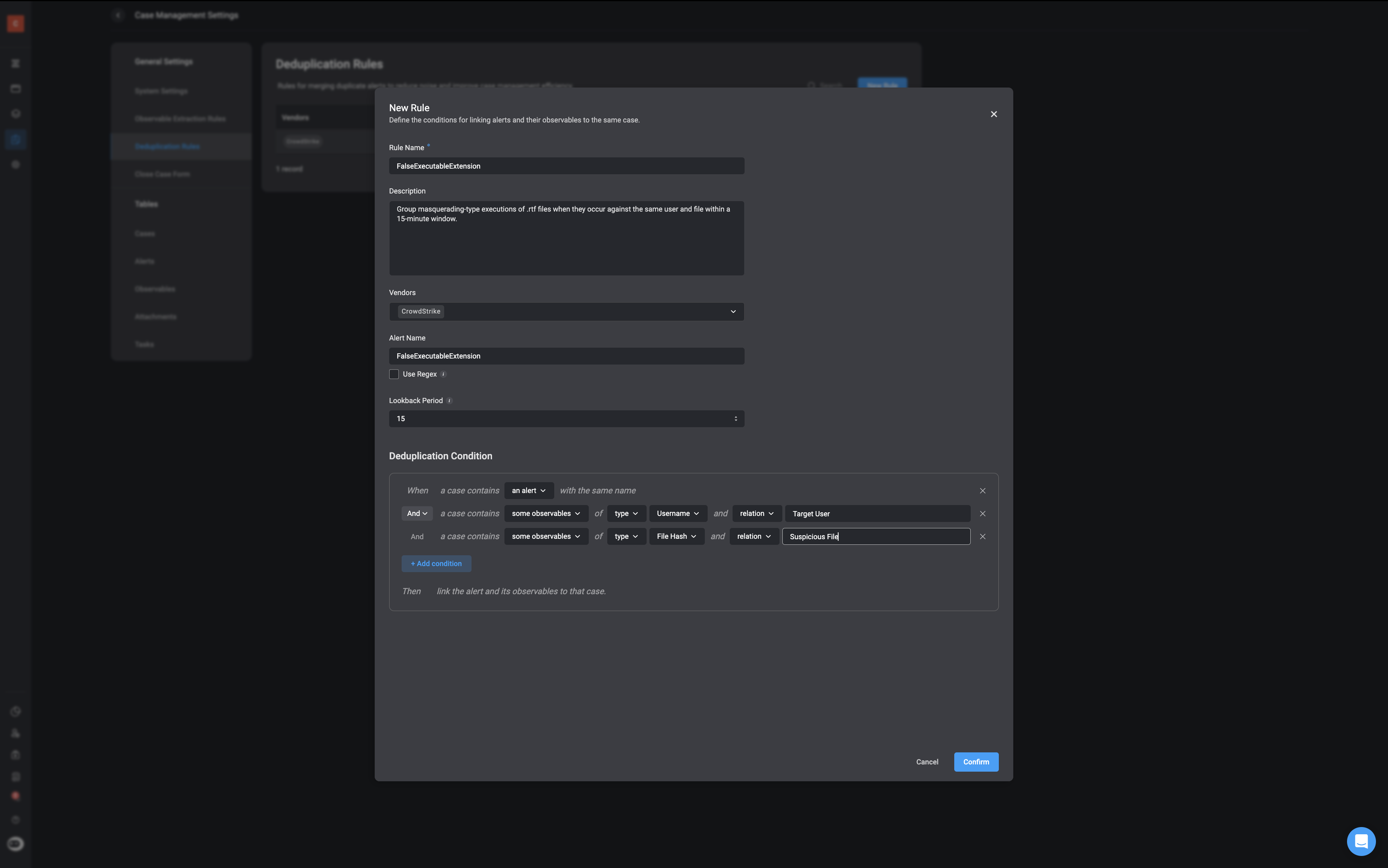
  * **Create an [Observable Extraction Rule](/docs/case-management/blinks-automated-case-management/observable-extraction-rules) to determine:**

    * **Observable Type** – In this use case example, we are extracting:
      * A **Resource UID** (unique identifier of the suspicious file).
      * An **IP Address** (if the file attempted to communicate externally).

    * **Observable Relations** – This defines how extracted observables relate to each other and the alert:
      * **whoami.rtf** (Resource UID) is linked to **FalseExecutableExtension** (alert).
      * If an external connection was made, the extracted **IP Address** would be linked to both the file and the alert.
      <Note>
        ֿ**Note:** Not all extracted observables will have observable relations, and defining such relationships is not mandatory. However, when relations exist—such as a file being associated with a specific IP address or command execution—these will be automatically extracted and identified as part of the process. This helps build a clearer picture of the attack chain and supports better investigation and response.
      </Note>

  <Frame>
    <img src="https://mintcdn.com/blinkops-2/BRfSL_EOO1Uh43ic/img/CaseManagement/ExtractedObservableRulesExample.png?fit=max&auto=format&n=BRfSL_EOO1Uh43ic&q=85&s=c10026fa267bf2267198e1edaf73cb7a" width="3456" height="2162" data-path="img/CaseManagement/ExtractedObservableRulesExample.png" />
  </Frame>

  ***

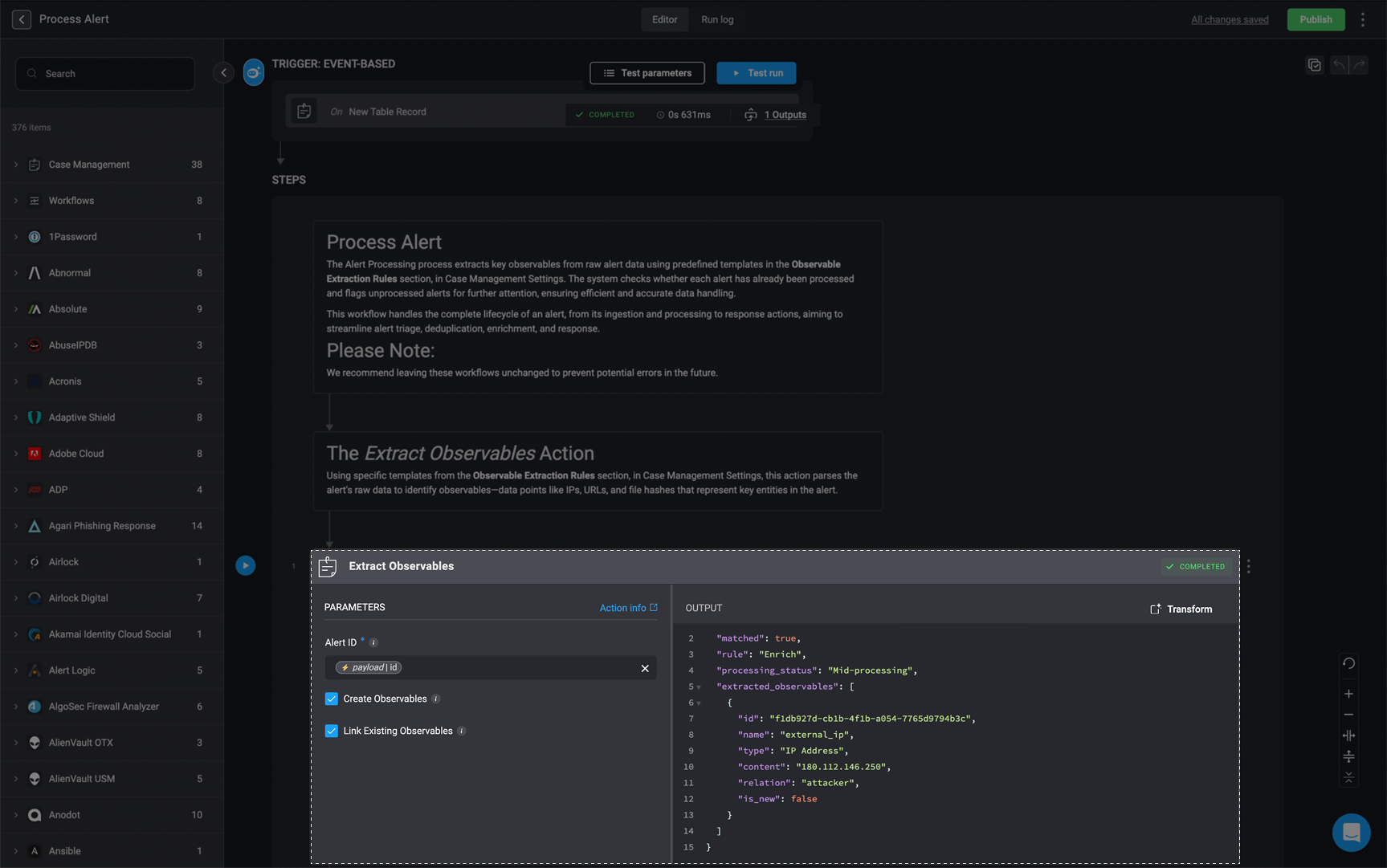
  **Step 3: Execute the Extract Observables Action**

  Once observables and observable relations (if applicable) are identified, we need to run the [Extract Observables action](/docs/case-management/blinks-automated-case-management/alert-processing/extract-observables).

  * This automated action parses the alert payload, extracts observables and observable relations(if they exist), and categorizes them according to the extraction rule.
  * The extracted observables and their relations are stored in the case management system for **correlation, enrichment, and further investigation**.
  * Security teams can then use these observables for threat intelligence lookups, IOC (Indicator of Compromise) correlation, and automated response actions.
  <Frame>
    <img src="https://mintcdn.com/blinkops-2/BRfSL_EOO1Uh43ic/img/CaseManagement/ExtractObservableUseCase.png?fit=max&auto=format&n=BRfSL_EOO1Uh43ic&q=85&s=2180b6e7cfbcb0da7f2ffc5c848c5152" width="1727" height="1081" data-path="img/CaseManagement/ExtractObservableUseCase.png" />
  </Frame>
</Accordion>