# Runners
A Runner is a lightweight execution agent that carries out the actions defined in your Blink workflows. Every runner belongs to a runner group, which determines its deployment location and operational scope.
By default, runners are hosted on Blink’s secure cloud infrastructure. However, for organizations that require tighter control over execution, Blink also supports self-hosted runners, which can be deployed within your own environment. This option provides enhanced flexibility, privacy, and security—allowing workflows to interact with internal systems, private networks, or on-prem services while keeping sensitive data fully contained.
***
## How a Runners Works
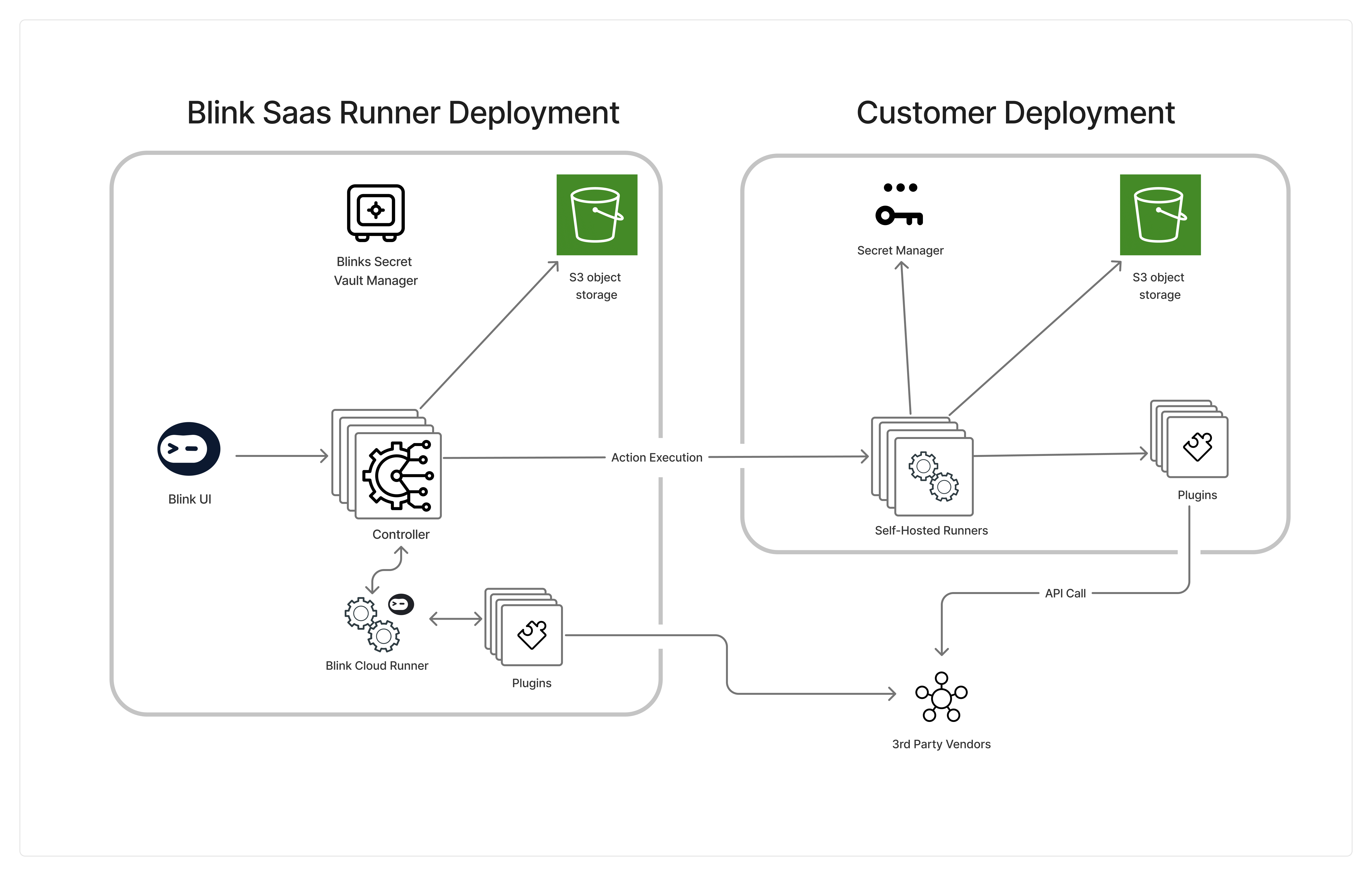
**Action Execution Flow:**
1. The runner is given an action from the controller and determines the specific plugin needed for the action.
2. The runner establishes an http communication with an existing plugin. If no plugin is currently running, the runner deploys a new plugin of the correct type.
3. The plugin receives information about the specific action, executes the action, and sends the resulting output back to the runner.
4. The runner than returns this output back to controller via a secure websocket connection.
 ***
## The Communication of a Runner
The runner establishes communication with Blink’s Controller to receive actions for execution. The controller will never be the one who initiates the communication
***
## Secret Credentials
Runners may retrieve the secret credentials required to execute actions from either of the following sources:
* **Blink’s Cloud Secret Store** – A secure, managed store provided by Blink.
* **Customer-Managed Secret Stores** – Currently supported options include:
1. [HashiCorp Vault](/docs/blink-platform/runners/secret-managers/hashicorp-vault)
2. [GCP Secret Manager](/docs/blink-platform/runners/secret-managers/gcp-secret-manager)
To request support for a different secret manager, contact our support team at [blink@support.com](mailto:blink@support.com) with the relevant details.
***
## Object Storage
Runners may temporarily store intermediate execution data in object storage. This data is automatically removed after the execution completes.
Supported storage options include:
1. [Blink Cloud Object Storage (default)](/docs/blink-platform/runners/object-storage/object-storage)
2. [Customer-Managed Object Storage](/docs/blink-platform/runners/object-storage/s3-object-storage) – We currently support any S3-compatible storage solution,
***
## Traffic from Blink to Your Environment
This refers to traffic *originating* from Blink’s cloud services—either the Controller or hosted Runners—toward your internal systems or third-party APIs.
**Action Required:**
To ensure Blink services can successfully reach your endpoints, configure your firewall or security groups to **allow inbound connections** from the following Blink public IP addresses.
`44.194.139.218`,
`3.217.19.166`,
`54.81.101.61`,
`107.20.97.38`
`18.153.177.126`,
`18.199.243.129`,
`18.199.203.194`,
***
## Traffic from Your Runner to Blink
This refers to traffic *originating* from your self-hosted Runner and *entering* Blink’s platform (`app.blinkops.com`, `eu1.blinkops.com`, or `us2.blinkops.com`).
**Action Required:**
Ensure your network’s egress rules **allow outbound connections** to Blink’s public endpoints, including the relevant CloudFront IP ranges:
Click here for the full JSON list of all CloudFront IP ranges
***
## Related Articles
Learn how to deploy a Blink Runner to execute workflows securely within your environment.
Learn more about Blink's secret managers that can be established within a customer's personalized environment, guaranteeing secure management of connections within their controlled setting.
Learn more about the Runner Settings and how you can use it to manage your Runners.
Deploy multiple on-prem Runners for high availability, parallel execution, or workload isolation.
***
## The Communication of a Runner
The runner establishes communication with Blink’s Controller to receive actions for execution. The controller will never be the one who initiates the communication
***
## Secret Credentials
Runners may retrieve the secret credentials required to execute actions from either of the following sources:
* **Blink’s Cloud Secret Store** – A secure, managed store provided by Blink.
* **Customer-Managed Secret Stores** – Currently supported options include:
1. [HashiCorp Vault](/docs/blink-platform/runners/secret-managers/hashicorp-vault)
2. [GCP Secret Manager](/docs/blink-platform/runners/secret-managers/gcp-secret-manager)
To request support for a different secret manager, contact our support team at [blink@support.com](mailto:blink@support.com) with the relevant details.
***
## Object Storage
Runners may temporarily store intermediate execution data in object storage. This data is automatically removed after the execution completes.
Supported storage options include:
1. [Blink Cloud Object Storage (default)](/docs/blink-platform/runners/object-storage/object-storage)
2. [Customer-Managed Object Storage](/docs/blink-platform/runners/object-storage/s3-object-storage) – We currently support any S3-compatible storage solution,
***
## Traffic from Blink to Your Environment
This refers to traffic *originating* from Blink’s cloud services—either the Controller or hosted Runners—toward your internal systems or third-party APIs.
**Action Required:**
To ensure Blink services can successfully reach your endpoints, configure your firewall or security groups to **allow inbound connections** from the following Blink public IP addresses.
`44.194.139.218`,
`3.217.19.166`,
`54.81.101.61`,
`107.20.97.38`
`18.153.177.126`,
`18.199.243.129`,
`18.199.203.194`,
***
## Traffic from Your Runner to Blink
This refers to traffic *originating* from your self-hosted Runner and *entering* Blink’s platform (`app.blinkops.com`, `eu1.blinkops.com`, or `us2.blinkops.com`).
**Action Required:**
Ensure your network’s egress rules **allow outbound connections** to Blink’s public endpoints, including the relevant CloudFront IP ranges:
Click here for the full JSON list of all CloudFront IP ranges
***
## Related Articles
Learn how to deploy a Blink Runner to execute workflows securely within your environment.
Learn more about Blink's secret managers that can be established within a customer's personalized environment, guaranteeing secure management of connections within their controlled setting.
Learn more about the Runner Settings and how you can use it to manage your Runners.
Deploy multiple on-prem Runners for high availability, parallel execution, or workload isolation.