> ## Documentation Index
> Fetch the complete documentation index at: https://docs.blinkops.com/llms.txt
> Use this file to discover all available pages before exploring further.
# Case Management Reportings
> The Case Management Reportings is a data source that represents the [case tables](/docs/case-management/cases/cases) in case management.
MTTx (Mean Time To x) data represents the time duration between different stages in a case's process. For example, it shows the minimum time it took to change a case's status from **open** to **in progress** or the case status SLA.
| Table Field | Description |
| ------------------------------------ | ------------------------------------------------------------------------------------------------------------------ |
| Case ID | The Case's ID number. |
| Case Name | The name of the Case. |
| Case Type | The type of Case. |
| Severity | The severity rank of your Case. It can be: **Low, Medium, High or Critical**. |
| Tags | Tags linked to a specific Case. |
| Vendor | The vendors used in the Case. |
| Case Manager | The user who manages the Case. |
| Collaborators | Users who collaborate on the Case. |
| Created at | Date and time the Case was created. |
| Status | The Status of the Case. |
| Status Types | The Status Type: **Not started Status**, **Active Statuses** or **Done Statuses** |
| Time from case open to chosen status | The time from when a case is in the open status and changed to different status type- duration field in `hh:mm:ss` |
| Time from Status to Status | The time duration between two selected case statuses-duration field in `hh:mm:ss` |
| Time in Status | The time in a status - duration field in `hh:mm:ss` |
| Time to close | The time span from case creation to closing a case - duration field in `hh:mm:ss` |
| Time to Assign | The time span from case creation to assigning the first case manager - duration field in `hh:mm:ss` |
**Important to Know**
**Time From Case Open to Status:**
* If a case starts in `OPEN`, moves through other active statuses, and later returns to a status it was in before, the timer for that status starts over. Because of this, the total time shown in the widget may increase each time the case re-enters the same status.
* Cases that are opened directly in an active status (for example, `IN PROGRESS`) are not counted in this widget. Only cases that begin in the `OPEN` status are included.
### Overview
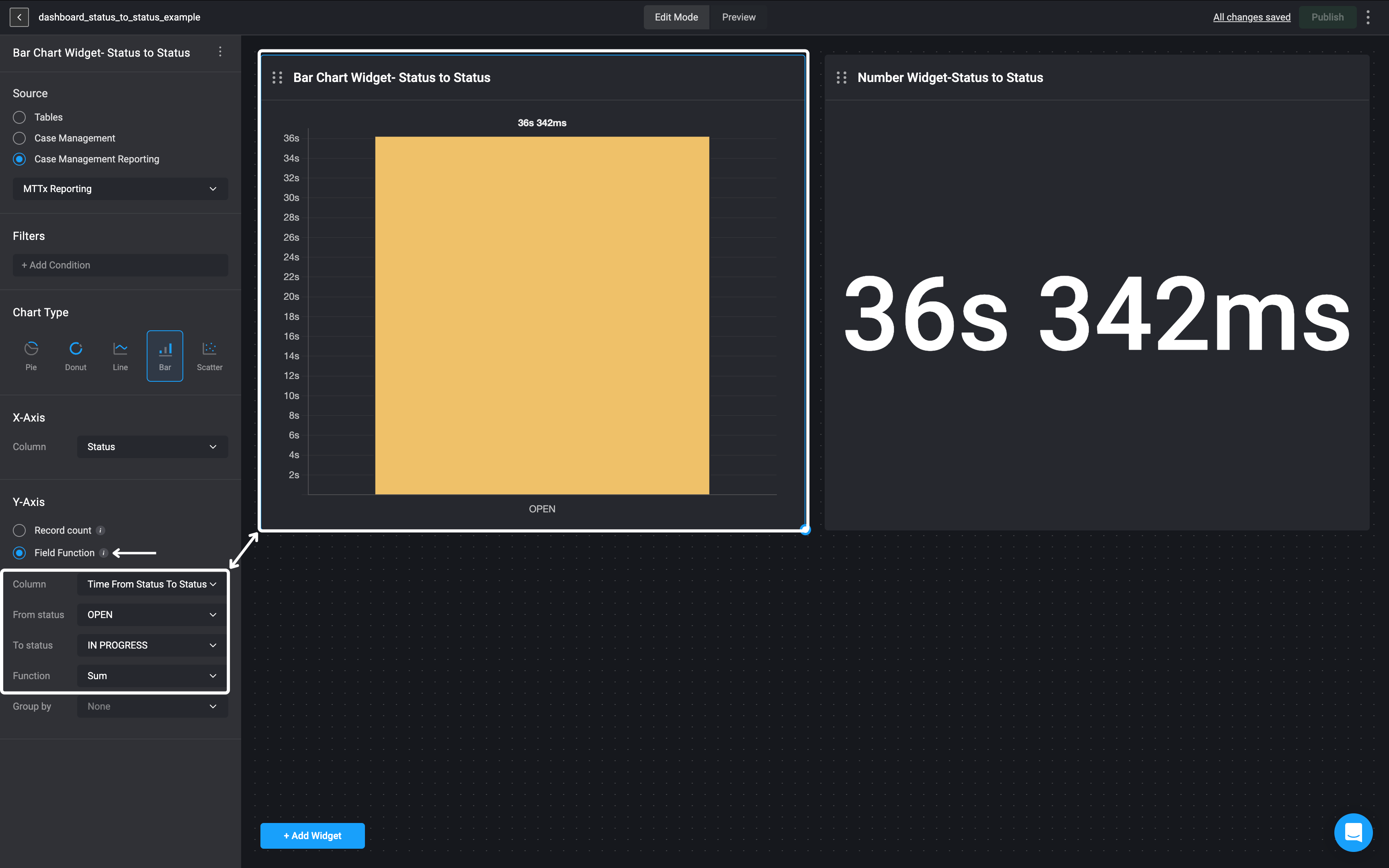
* When using the MTTx Reporting case table as the widget source, users can select the time from the **Status to Status** column under ‘Field Function’ option.
* This field measures the duration between two selected case statuses in the format `hh:mm:ss`.
* This allows users to specify the **"From"** and **"To"** statuses, enabling precise tracking of transitions between specific stages in the case lifecycle.
### Use Case Example
* This bar chart shows the **sum** of the time taken for cases to transition from **OPEN** to **IN PROGRESS**, based on data from the **MTTx Reporting** case table. It aggregates the total duration cases remained in the **OPEN** status before moving to **IN PROGRESS**, resulting in **36 seconds and 342 milliseconds**, helping users track and analyze the process efficiency.
 ## Case Workflows
This data represent all the cases created using [Case Actions](/docs/case-management/case-management-workflow-actions/case-actions) in an automated workflow.
## Case Workflows
This data represent all the cases created using [Case Actions](/docs/case-management/case-management-workflow-actions/case-actions) in an automated workflow.
| Table Field | Description |
| --------------------- | ----------------------------------------------------------------------------- |
| Workflow Name | The name of the Workflow. |
| Workflow ID | The Workflow's ID number. |
| Pack Name | The name of the Workflow's Pack. |
| Workflow Run Duration | The duration time of the Workflow's execution. |
| Case ID | The Case's ID number. |
| Case Created At | Date and time the Case was created. |
| Case Name | The name of the Case. |
| Case Type | The type of Case. |
| Severity | The severity rank of your Case. It can be: **Low, Medium, High or Critical**. |
| Tags | Tags linked to a specific Case. |
| Vendor | The vendors used in the Case. |