> ## Documentation Index
> Fetch the complete documentation index at: https://docs.blinkops.com/llms.txt
> Use this file to discover all available pages before exploring further.
# Dashboard Use Case Example
> Build a Mean Time to Resolve (MTTx) reporting dashboard using Blink's dashboard builder.
## Average Time to Assign a Case Manager to a Case According to Case Severity
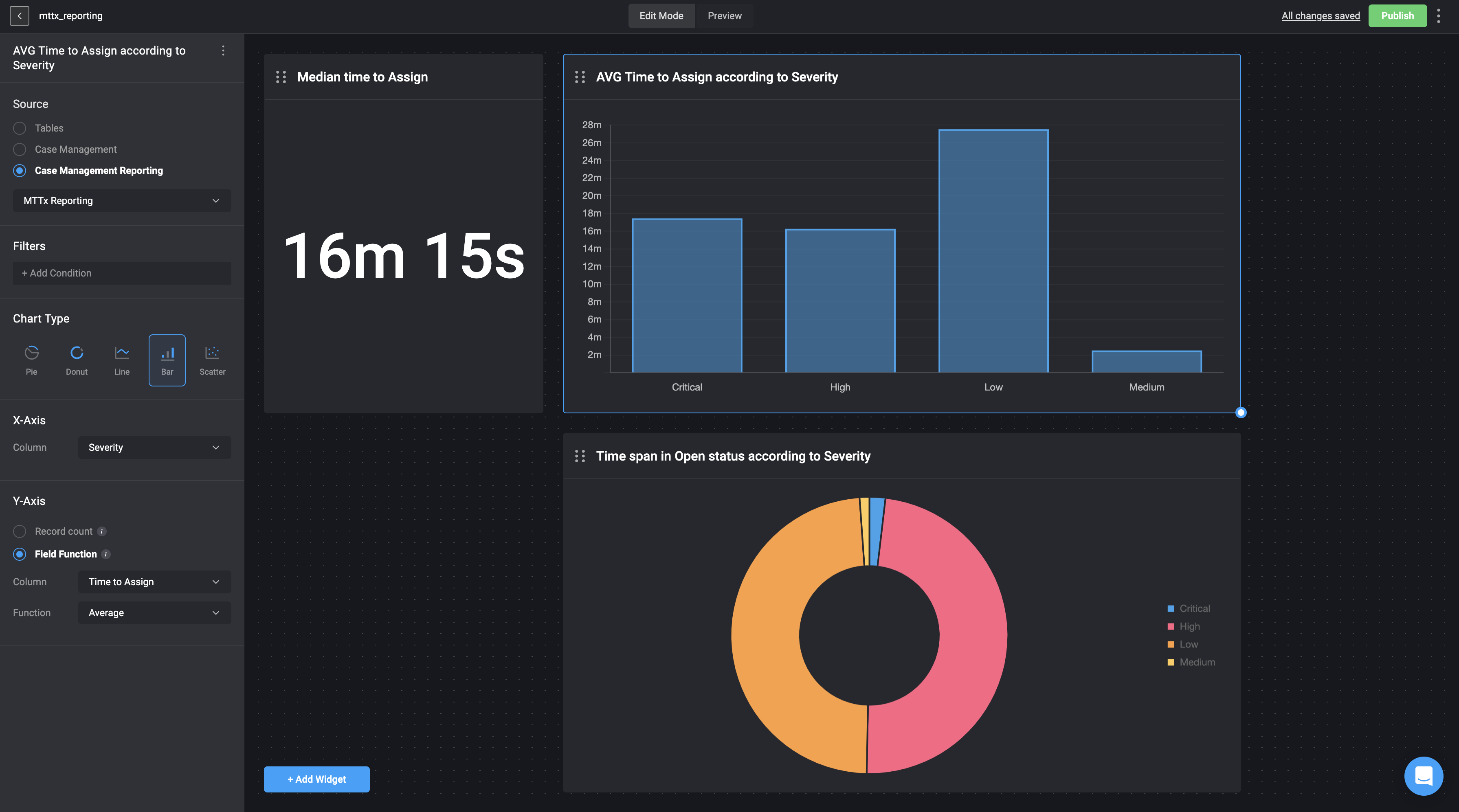
The following use case example displays the [MTTx data source](/docs/blink-platform/dashboards/building-a-dashboard/source-types/case-management-reporting#mttx-reporting) in the form of a bar chart, collected from the Cases Tables ([Case Management Reporting](/docs/blink-platform/dashboards/building-a-dashboard/source-types/case-management-reporting)). This chart illustrates the average time taken to assign a case to a Case Manager, grouped by the severity of the cases. The data visualization helps in understanding how the assignment time varies with different severity levels, providing insights for optimizing the case management process.
1. Adding a Widget: In the Dashboard Building interface, we selected and added the [Bar Chart Widget](/docs/blink-platform/dashboards/building-a-dashboard/widgets/charts#bar-chart-data-configuration) to represent the data.
2. Selecting a Data Source: We chose [Case Management Reporting](/docs/blink-platform/dashboards/building-a-dashboard/source-types/case-management-reporting) as our data source and selected the MTTx (Mean Time To x) data. MTTx represents the time duration between different stages in a case's process.
3. Configuring the Axes:
* X-axis: Displays the Cases Severity column - **critical**, **high**, **low** and **medium**.
* Y-axis: We displayed the average time duration it took to assign Case Manager to a case from when the case was first created.