> ## Documentation Index
> Fetch the complete documentation index at: https://docs.blinkops.com/llms.txt
> Use this file to discover all available pages before exploring further.
# Blink Bot For Slack
> Use the Blink bot for Slack to run self-service portal workflows directly from your Slack workspace.
## Using the Self-service Portal via Slack
Blink has created bot for Slack to seamlessly execute apps available in the Self-service portal directly from your Slack environment. Every Workflow that is exposed in the portal is automatically exposed to the bot for Slack.
Please note only admins can connect the Blink Bot for Slack
## Connecting Slack to the Blink platform
To run workflows directly from Slack, you need to connect your Slack workspace to your Blink account. Follow these steps:
1. In the Blink Platform, go to the bottom left corner and click your profile icon (a colored circle with your initials).
2. Navigate to **General**, then scroll to the **Bot for Slack** section. Click **Connect to Slack**.
3. A permission request dialog will appear, asking for access to your Slack workspace.
4. Click **Allow** to grant permission. Once connected, you’ll see **Connected to Slack** in your account settings.
## Executing a Workflow via Slack
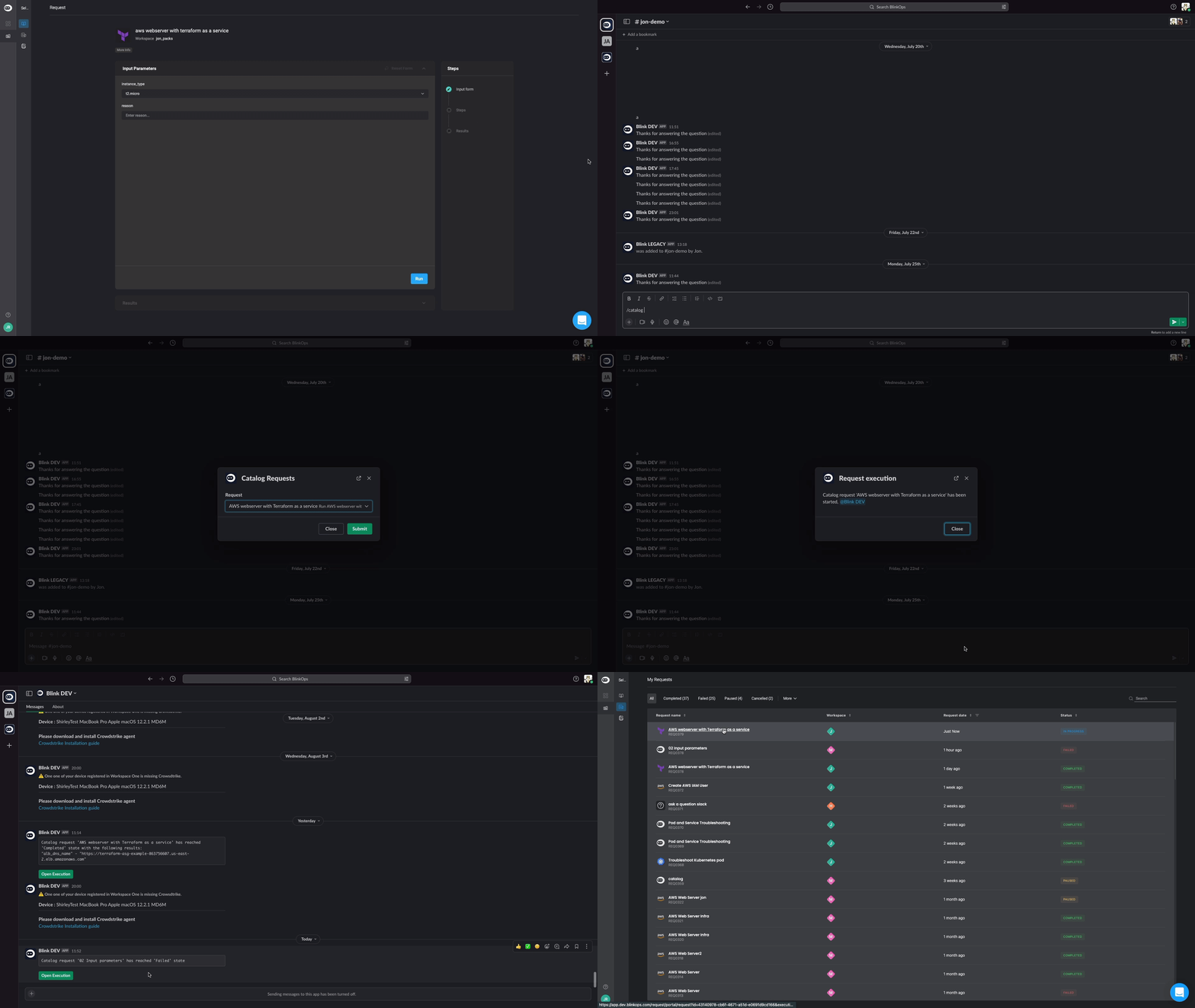 1. In any channel or conversation, enter ***/***. Select **Portal** from the drop down menu.
2. If you are not logged in to the Blink platform, you will receive a message to **Go to login page**. Click **Go to login page** and log in to Blink. If you logged in successfully, **Thanks for logging in** will appear on your Slack feed.
3. Enter ***/portal*** and click **Self service portal request**. A list of all items available in the Self-service portal is displayed.
4. Click on any item in the portal. You will receive a message that the Workflow is running. If the Workflow needs input parameters, you will be prompted to enter them before running.
The Blink bot will notify you of your request, the Workflow state and its results.
1. In any channel or conversation, enter ***/***. Select **Portal** from the drop down menu.
2. If you are not logged in to the Blink platform, you will receive a message to **Go to login page**. Click **Go to login page** and log in to Blink. If you logged in successfully, **Thanks for logging in** will appear on your Slack feed.
3. Enter ***/portal*** and click **Self service portal request**. A list of all items available in the Self-service portal is displayed.
4. Click on any item in the portal. You will receive a message that the Workflow is running. If the Workflow needs input parameters, you will be prompted to enter them before running.
The Blink bot will notify you of your request, the Workflow state and its results.